Shamus Neo Zhi Kai - Project Portfolio for OwlMoney
Hello there, I am Shamus.
I am currently pursuing a degree in Information Security at the National University of Singapore (NUS).
I enjoy server and network administration as well as building and breaking applications.
This portfolio serves to document my extensive involvement and contribution in a team-based project CS2113T (Software
Engineering & Object-Oriented Programming) module by NUS.
This project spans over about eight weeks and was completed together with a team of five members
(consisting of Mong Zheng Wei, Brian Tan Kian Ming, Terence Tan Wee Theng,
Valerie Tan Yi Jia and myself).
About the project
My team and I were tasked with enhancing a basic Command Line Interface (CLI) based personal assistant, named Duke
for our Software Engineering Project. We chose to morph it into a financial tracker and investment management
application called OwlMoney. This enhanced application targets undergraduates and fresh graduates and aims to help
them track and manage their finances.
Some features of OwlMoney include tracking of both expenses and expenditures as well as tracking
credit cards and investments such as investment bonds.
My role as a team leader was to perform project management as well as to write the baseline code for the team to get
started. On top of that, I was also in charge of writing codes for the investment, bonds, storage and
some parts of the commands section.
Lastly, I played a major role while collaborating with my team to implement a custom string parser, which was
instrumental in enabling users to be able to enter the parameters of complex commands in any order.
The following sections illustrate these enhancements in more detail and shows the relevant sections I have
contributed to the project as a whole, as well as the relevant sections I have added to the user and developer
guides in relation to these enhancements.
Understanding this Project Portfolio
The following symbols are used through this project portfolio:
|
This symbol denotes information that you may want to take note of. |
|
This symbol denotes a tip that you may find useful when using our application. |
|
This symbol denotes a warning message which you need to be careful of when using our application. |
Additionally, you may also encounter the following text styles:
-
Commands, parameters, and file paths will be in this
format -
Important messages will be bold
Summary of Contributions
This section shows a summary of my coding, documentation, and other helpful contributions to the team project.
Enhancement added: I added the ability to add investment accounts and bonds.
-
What it does: The
investmentaccount allows the user to create an account dedicated forinvestmentpurposes. -
Justification: As we are targeting undergraduates and fresh graduates who usually do not have good financial literacy, I believe that OwlMoney can play a role in educating them on separating spending from
investment. Therefore, no spending transactions can be made on theinvestmentaccount and no investments can be bought in a savings account. -
Highlights: This enhancement automatically credits interest for
bondsadded into theinvestmentaccount every 6 months from the date of purchase, eliminating the need for the user to manually calculate and enter the interest in every half-yearly. This prevents errors caused by users forgetting to enter the interest since it only credits twice a year. -
Credits: A portion of recording
transactionsand similar features across all bank accounts were inherited from a common parent classbankwhich was coded by both Brian Tan Kian Ming and I.
Other notable features I was in charge of implementing for the entire project were:
Storage: Responsible for saving data persistently and ensuring the program’s data is imported back smoothly.
Logging: Enable developers and tech-savvy users to debug and see errors that were logged in OwlMoney.
With these 2 features, my team was able to swiftly make use of my comprehensive functions to implement
these features on their portion of code.
Code contributed:
Other contributions:
-
Project Management:
-
There were a total of 5 releases, from version 1.0 to version 1.4. I managed the team’s repository and was responsible for producing all of the releases on Github.
-
-
Enhancements to existing features:
-
Updated the persistent storage to use
OpenCSVinstead of writing into a conventional.txtfile. This provides better clarity and organisation of stored data in secondary storage.
-
-
Documentation:
-
Responsible for writing and maintaining over 70% of content on both the User Guide and Developer Guide as well as making it presentable in the
.adocformat which can be rendered and converted to various other formats since it is platform-independent.
-
-
Community:
-
Contributed to forum discussions (examples: PRs #86, #61, #60, #57, #26, #8)
-
Reported substantial amount bugs in another team’s project and provided constructive suggestions, MooMooMoney (examples: #156, #157, #158, #159, #160, #161, #162, #163, #164, #165)
-
Reported bugs in module’s teaching materials (examples: PRs #11)
-
-
Tools:
-
Integrated a third party library OpenCSV to the project for persistent
storage. -
Integrated Travis & AppVeyor Continuous Integration (CI) tools. (examples: PRs #119)
-
Integrated Coveralls & Codecov Code coverage tools. (examples: PRs #133)
-
Integrated Codacy Code analytics tool.
-
Integrated Netlify & GitHub Deployment Deployment preview tools to the team’s repository (examples: PRs #119, #101, #103)
-
Updated Gradle build configuration to automate and simplify the build process (examples: PRs #101)
-
Added a new Github plugin (project-bot) to automate triaging of issues in the team’s Project Board
-
Contributions to User Guide
The sections below showcases my ability in writing documentation targeting end-users to guide them in using the various features of OwlMoney in a clear and concise manner. It includes pictures that display the results when necessary |
Investment Account Management
In this section, you’ll be introduced to commands and parameters that help you to manage your investment account and bonds that you can track in OwlMoney.
Below is a list of command parameters that you can expect to use for the commands in this section.
Parameter |
Description |
Acceptable Range of Values |
|
Indicates the name of the investment bank account. (e.g. DBB Vickers Account) |
Take note that there is a maximum of 30 character limit. |
|
Indicates the amount of money. (e.g. 2113.30) |
|
|
Indicates the name of the investment bond purchased. (e.g. June SSB) |
Take note that there is a maximum of 30 character limit. |
|
Indicates the coupon rate of the investment bond in percentage. (e.g. 1.92) |
|
|
Indicates the date the bond was purchased. (e.g. 2/2/2019) |
|
|
Indicates the number of years the investment bond lasts. |
|
Adding investment bank account /add /investment
Want to start investing to grow your wealth? No problem!
All you need to do is to add an investment account!
Here’s how you can use the /add /investment command.
Command Syntax
/add /investment /name ACCOUNT_NAME /amount AMOUNT
|
There can only be a maximum of 3 investment accounts. |
Example
-
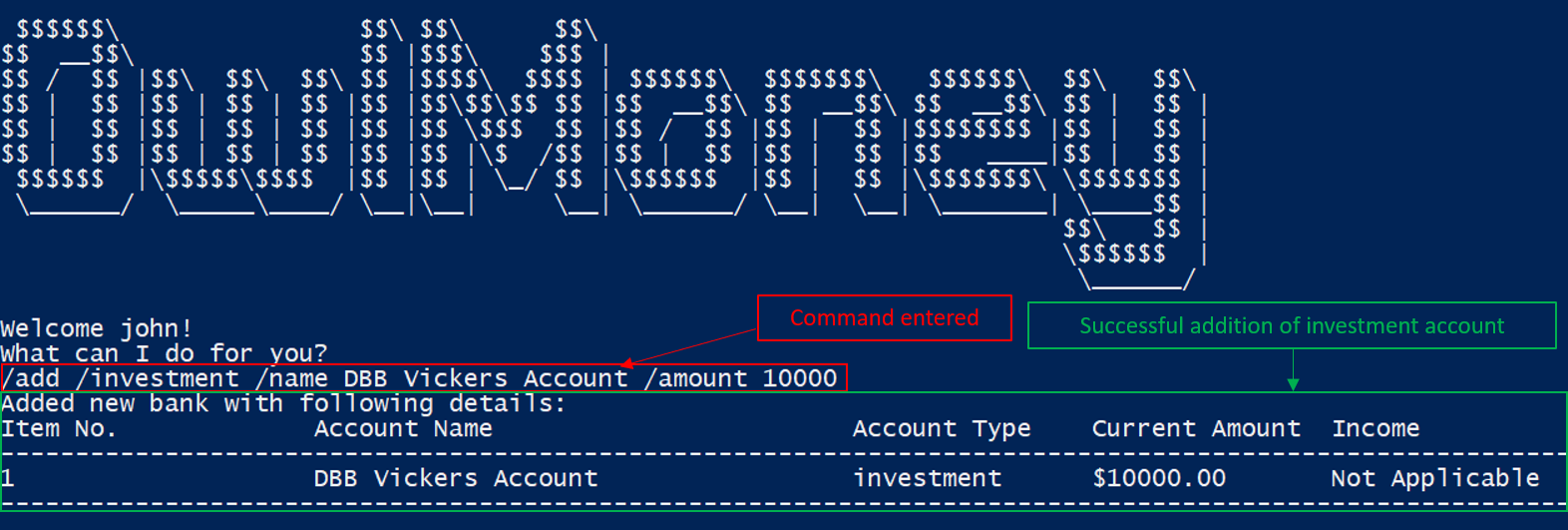
/add /investment /name DBB Vickers Account /amount 10000
Adds an investment account named DBB Vickers Account which has an initial amount
of $10000 inside that you can start investing with.
/add /investmentEditing investment bank account /edit /investment
Changes made to your investment account? Here is how you can do it!
Command Syntax
/edit /investment /name ACCOUNT_NAME [/newname ACCOUNT_NAME] [/amount AMOUNT]
|
At least one of |
Example
-
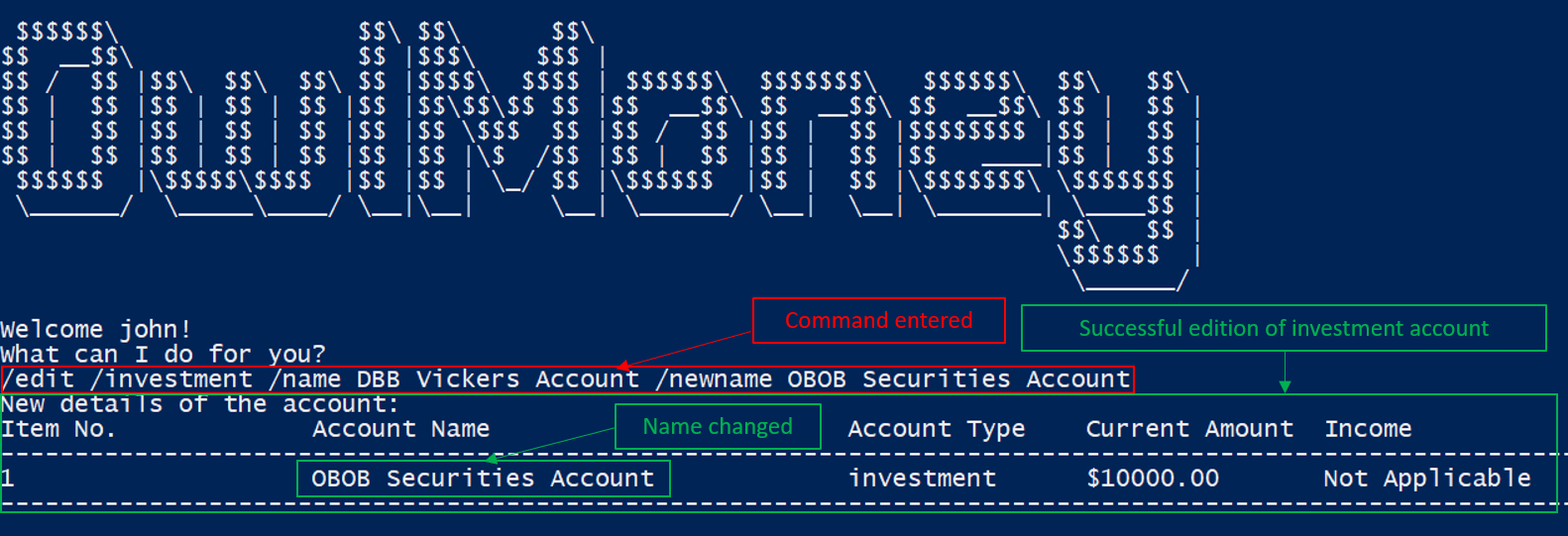
/edit /investment /name DBB Vickers Account /newname OBOB Securities Account
Edits the name of the account from DBB Vickers Account to OBOB Securities Account.
/edit /investment-
/edit /investment /name DBB Vickers Account /amount 50000
Edits the amount in DBB Vickers Account to $50000.
-
/edit /investment /name DBB Vickers Account /newname OBOB Securities Account /amount 50000
Edits the name of the account from DBB Vickers Account to OBOB Securities Account and the amount in the account
to $50000.
Deleting investment bank Account /delete /investment
You can also close your investment bank account on OwlMoney as well!
Command Syntax
/delete /investment /name ACCOUNT_NAME
|
All transactions (e.g. bonds) related to the investment bank account will be deleted. |
Example
-
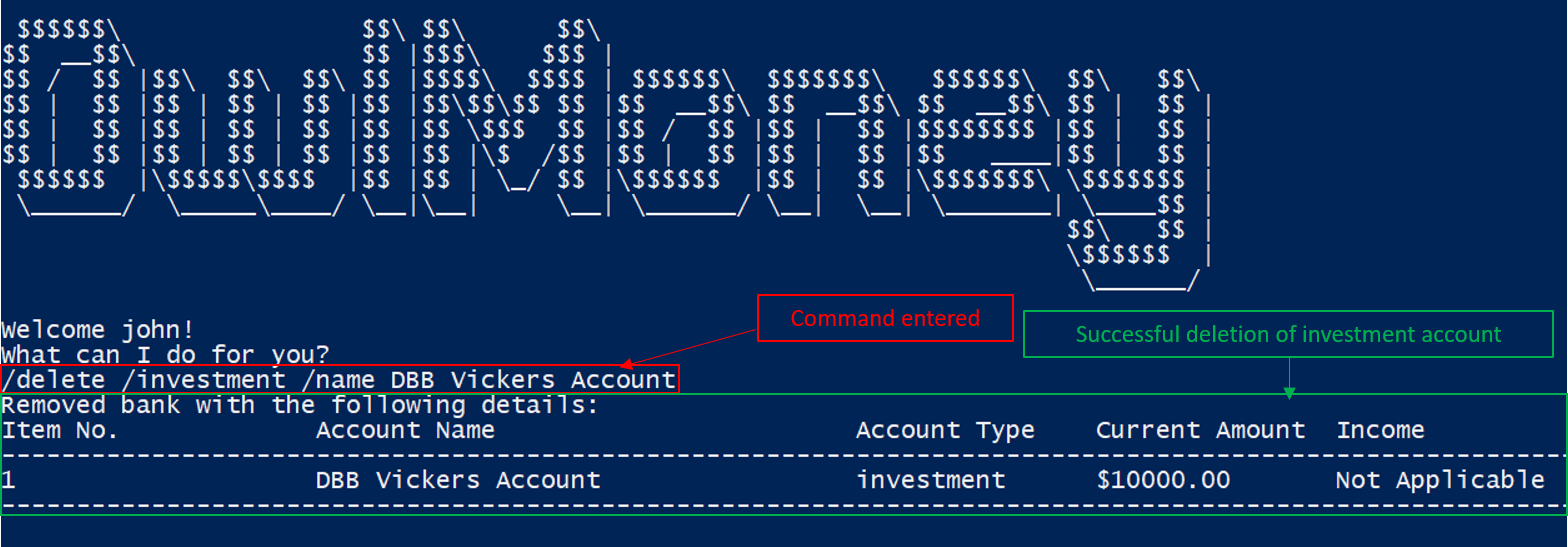
/delete /investment /name DBB Vickers Account
Deletes an investment account named DBB Vickers Account.
/delete /investmentAdding investment bonds /add /bonds
Signed up for a bond? Finding it difficult to keep up with the interest? No worries! OwlMoney allows efficient tracking of your semi-annual coupon interest!
Command Syntax
/add /bonds /from ACCOUNT_NAME /name BOND_NAME /amount AMOUNT /rate BOND_RATE /date DATE /year YEARS
|
An investment account needs to be created first to add bonds. Bonds can only be added to investment accounts. There can only be a maximum of 20 investment bonds per investment account. |
Example
-
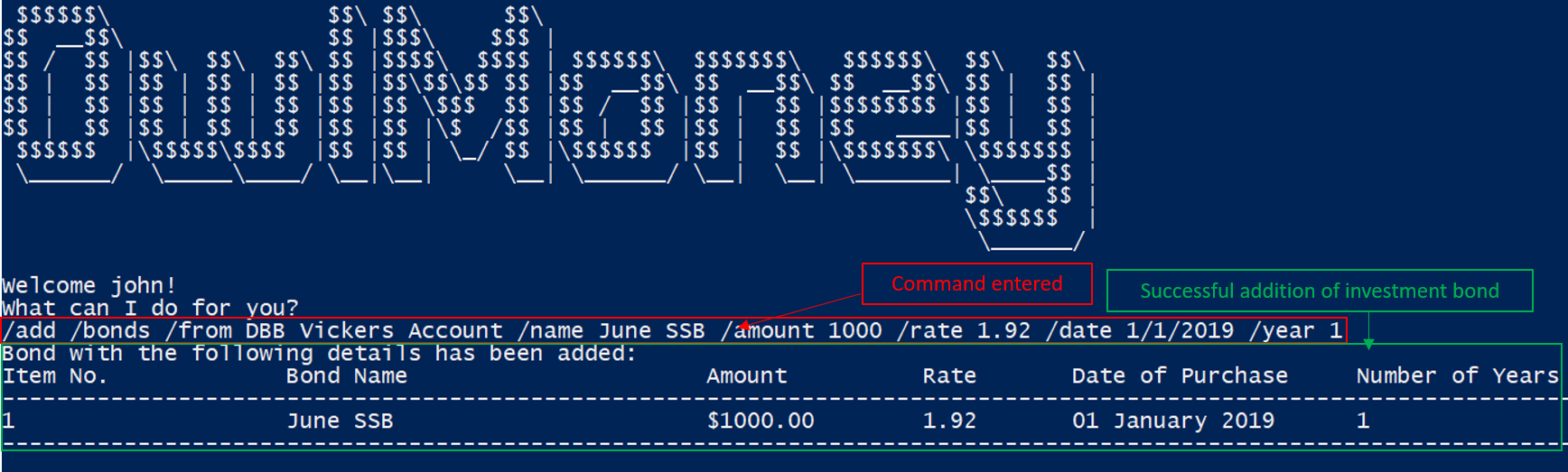
/add /bonds /from DBB Vickers Account /name June SSB /amount 1000 /rate 1.92 /date 1/1/2019 /year 1
Adds a bond named June SSB charged to DBB Vickers Account at $1000 with an interest rate of 1.92% bought on
1/1/2019 for 1 year(s).
/add /bondsEditing Bond details /edit /bonds
Change in your investment details? Edit them here!
Command Syntax
/edit /bonds /from ACCOUNT_NAME /name BOND_NAME [/rate BOND_RATE] [/year YEARS]
|
At least one of Only Editing
|
Example
-
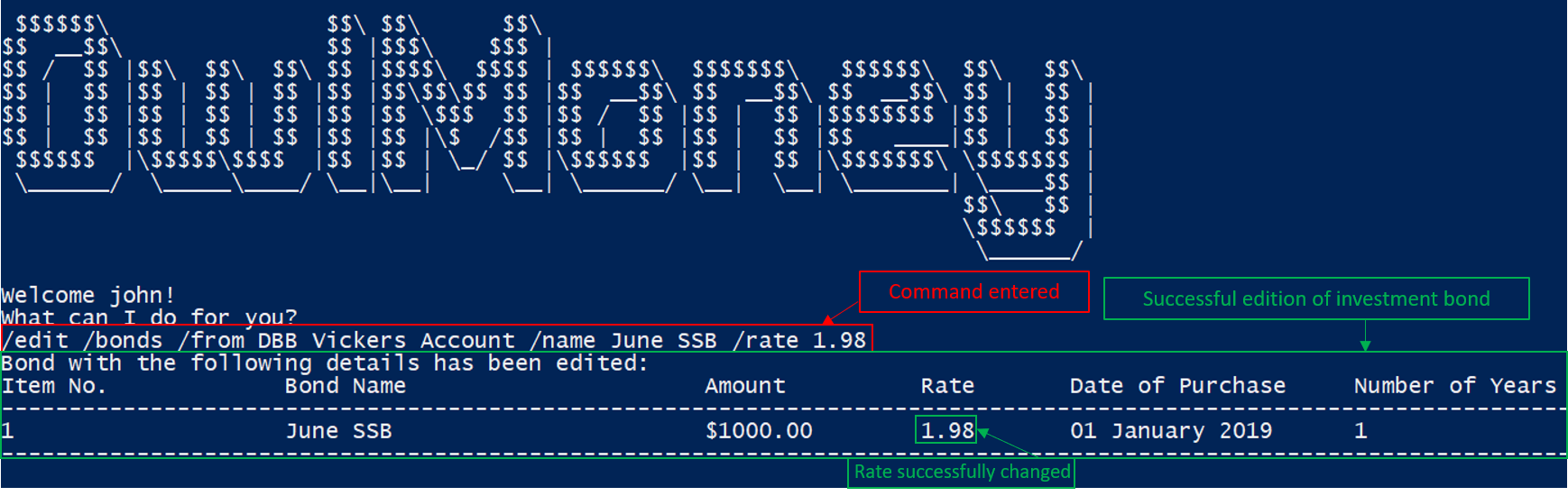
/edit /bonds /from DBB Vickers Account /name June SSB /rate 1.98
Edits the bond named June SSB charged to DBB Vickers Account with a new interest rate of 1.98%.
/edit /bondsDeleting bonds /delete /bonds
Sold your bonds? Delete it from OwlMoney!
Command Syntax
/delete /bonds /from ACCOUNT_NAME /name BOND_NAME
Example
-
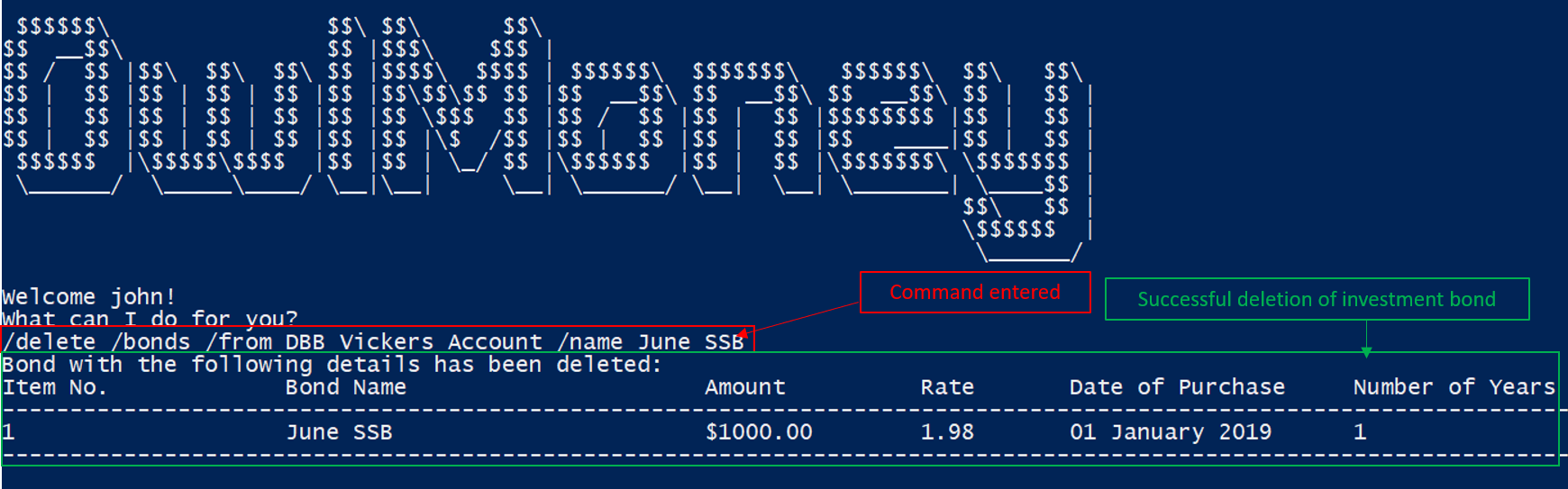
/delete /bonds /from DBB Vickers Account /name June SSB
Deletes the bond named June SSB charged to DBB Vickers Account.
/edit /bondsContributions to Developer Guide
A developer guide is important in allowing future developers to continue developing OwlMoney The following sections illustrate my ability in writing documentation to provide developers insights on the design of the application. It also showcases some notable technical design considerations and depth of my contributions to the project. |
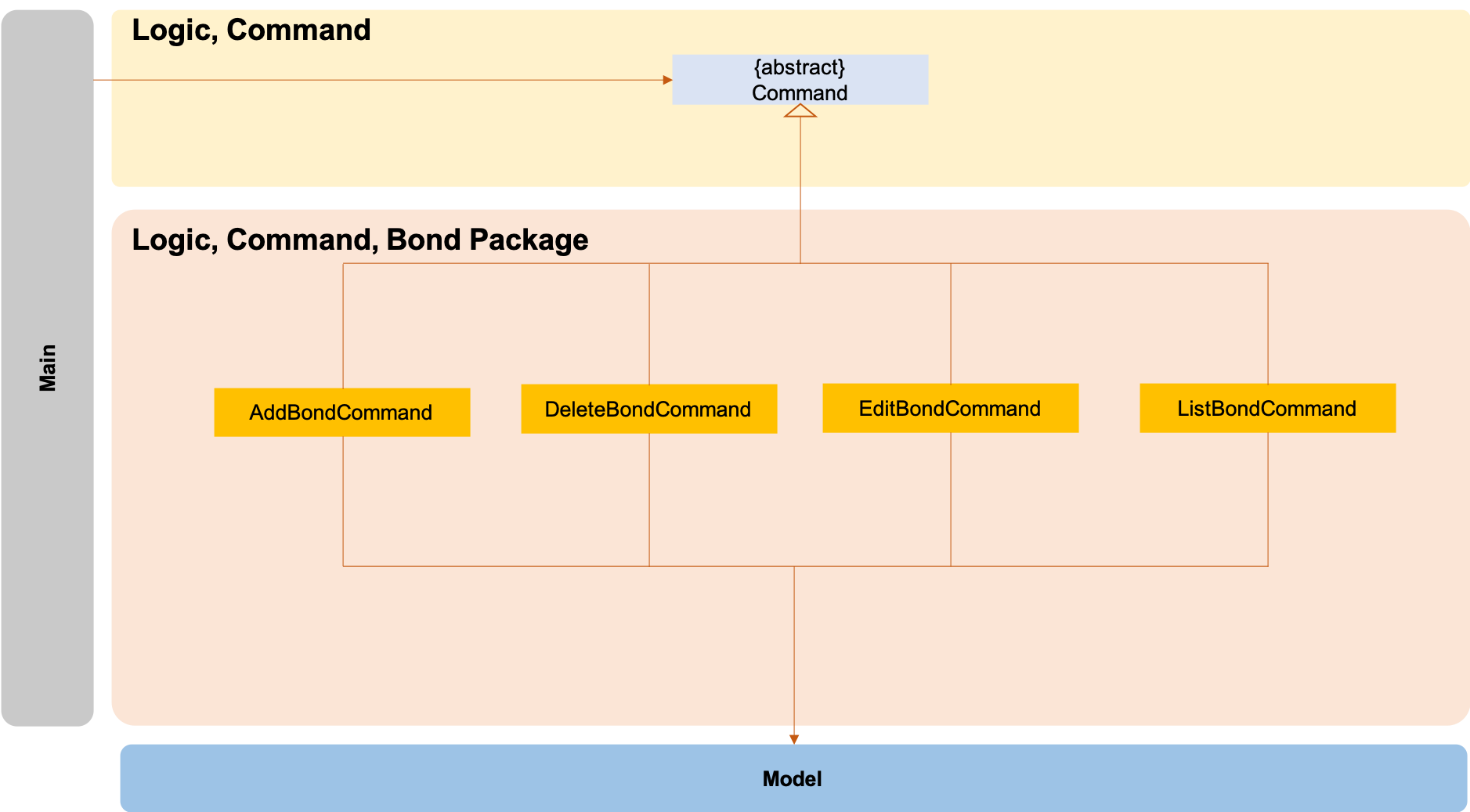
The logic.command.bond package consists of Bond classes with the following features:
-
Add
-
Edit
-
Delete
-
List
Main will call the specific Bond command class that will construct the required parameters before calling the
Profile class in Model to execute.
Editing Bonds
The /edit /bonds feature aims to help users update the specific details of the investment bonds that they
purchase. This is to enable them to not go through the trouble of deleting and re-adding the bond if they enter the
details wrongly by mistake.
Current Implementation
The current implementation of editing bonds only allows for the edition of rate and year where the year
parameter can only be changed to a higher integer than the original year currently stored. The reason behind only
allowing these 2 parameters to be changed was because we wanted consistency across all records of crediting
interest throughout the lifespan of the investment bond.
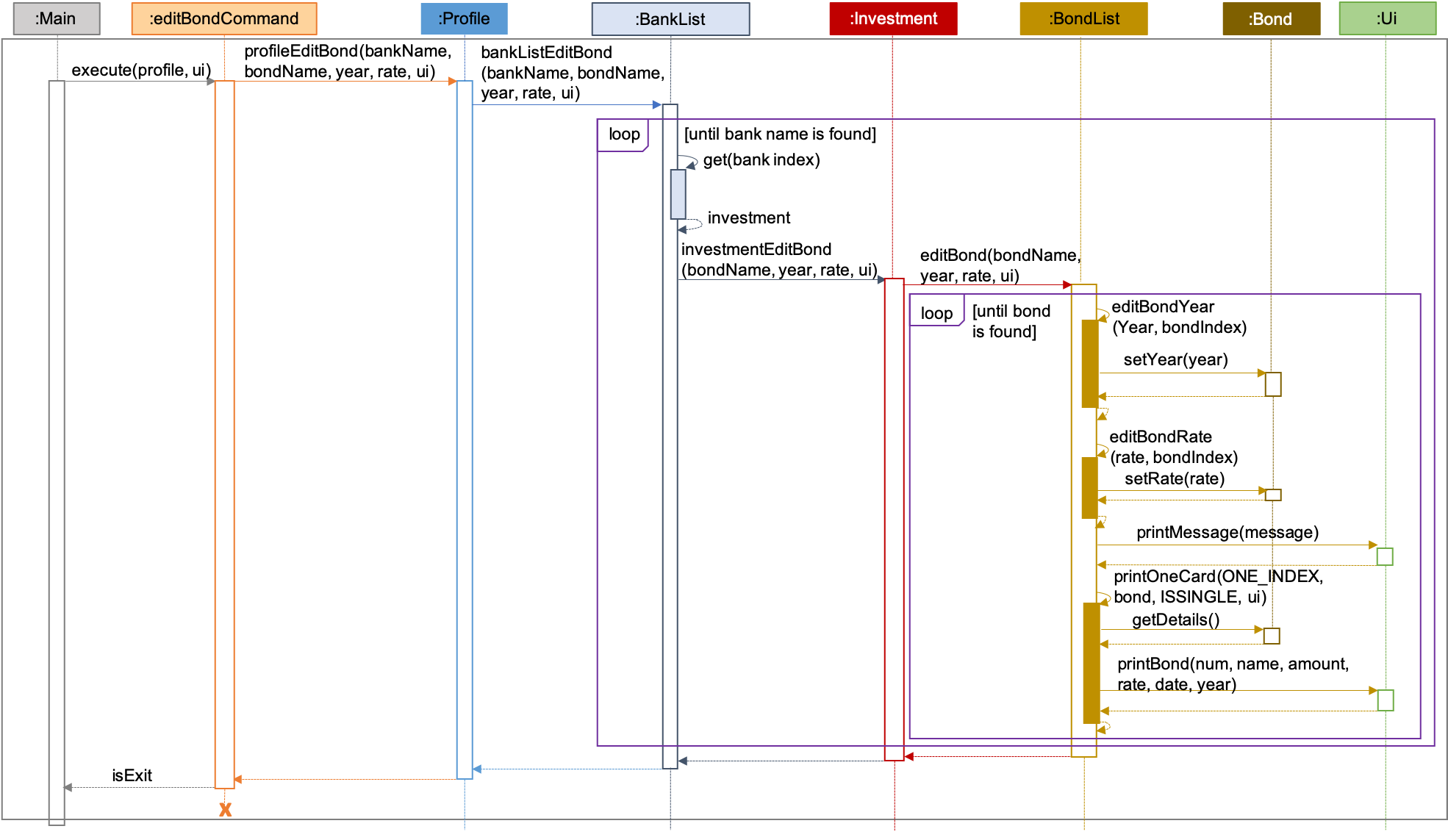
| The sequence diagram presented above is assumed to be a valid command which will produce a successful result. |
The sequence diagram presented above depicts the interaction between the Logic and Model component for running
EditBondCommand.
The EditBondCommand requires a minimum of 3 and up to a maximum of 4 inputs:
-
Investment Account’s name
-
Bond’s name
-
At least 1 of the 2 inputs:
-
Rate
-
Year of maturity
-
When the user executes the EditBondCommand, the following steps are taken by the application:
-
When
EditBondCommandis executed, it will invokeprofileEditBond. -
Within the invocation of
profileEditBond, a method namedbankListEditBondwill be invoked. -
Once invoked,
bankListEditBondwill perform the following checks based on the bank name specified:-
Check for the existence of the investment account containing the bond.
-
bankListEditBond will throw an error if the above check fails.
|
-
After passing the above checks, the method
investmentEditBondwill be invoked. -
Within
investmentEditBond, the method namededitBondwill be invoked. -
Once invoked,
editBondwill perform the following checks:-
Check for the existence of the bond within the investment account.
-
Check whether the newly specified year of maturity for the bond is more than or equal to the current year of maturity through the method
editBondYear.
-
editBond will throw an error if the above check fails.
|
-
After passing all of the above checks,
editBondwill update the bond details with the new details specified using:-
editBondRate→ edits bond’s interest or coupon rate. -
editBondYear→ edits year of maturity.
-
-
Once the bond object has been edited, the updated details of that bond object will be displayed to inform the user of the successful editing of the bond.
Design Considerations
This section describes the various design considerations taken when implementing the /edit /bonds feature.
Aspect: Choice of whether to allow editing of the bond to tie to which investment account as well as its name
| Approach | Pros | Cons |
|---|---|---|
1. Allowing changing of the investment bank account that the bond ties to. |
|
|
2. Allowing the changing of bond’s name. |
|
|
3. Disallowing the changing of both parameters. |
|
|
After weighing the pros and cons, approach 3 was taken.
Firstly, doing so would reduce the coupling and dependencies between transactions and investment banks. Although it may seem restrictive to limit the type and number of parameters that can be changed, it is beneficial both to you, the developer and the user, when developing and using the program. Developing the alternative ideas mentioned would result in a high risk of logic and coding errors, leaving room for bugs to be exploited.