Valerie Tan - Project Portfolio for OwlMoney
Hello I am Valerie, a Year 2 Undergraduate pursuing Information Security in the National University of Singapore (NUS).
This portfolio aims to provide a detailed outline of my contributions during the development of our group’s application, OwlMoney.
We are a team of five, led byShamus Neo Zhi Kai and comprises of Brian Tan Kian Ming, Mong Zheng Wei, Terence Tan Wee Theng and myself.
About the project
OwlMoney is a finance tracker and investment management application, specially created and developed for our Software Engineering and Object-Oriented Project, focused on designing and implementing a command-line based personal assistant.
We decided to name it OwlMoney as it equipped with the mission to help Undergraduates / Fresh Graduates manage and track their finances efficiently, effectively, and more conveniently.
My main responsibility when developing this application was to implement and
design the code for goals feature. The following sections will go in-depth on goals feature and
showcase my team contribution as one of OwlMoney’s Developer for the past 8-weeks.
Summary of Contributions
Here are the links as a reference to my implementation for goals Features:
Enhancement added
goals features functionality for users to add, delete, edit and list financial goals.
OwlMoney users have a choice of linking their saving accounts to the goals added to better facilitate tracking of
their goals progress.
- What
add goalsdoes -
The
addgoals command allows user to enter a new goal. The user may choose to link their savings account by specifying/fromparameter with a valid savings account. User also has the option to specify their goals deadline usingin(days) orfrom(date) parameter. - What
edit goalsdoes -
The
editgoals command enables users to change any valid input parameter if there are any changes to the goals they have added. In addition, if user has not linked any savings account, they can also do it here by specifying/fromparameter. - What
delete goalsdoes -
In the event when a goal is no longer relevant, the
deletegoals command deletes the specified goals. - What
list goalsdoes -
Listing of all financial goals user has set.
- Justification of features added
-
Our target users for OwlMoney are Fresh Graduates / Undergraduates, these features stated above were necessary to model real-life setting of having goals and target, providing users the flexibility whilst achieving their target goals.
- Highlights
-
goalsworks well with future implementations and enhancement for OwlMoney such as linking to other accounts or unlocking new achievements.goalsare meant to motivate users to save and properly manage their finances for any financial goals that they wish to achieve. Each goals have a deadline set and users goals will be marked automatically when their savings account reach their target amount. - Credits
-
Collaborated with Brian Tan Kian Ming on the linking of user’s goal to savings account.
Other contributions
-
Project Management:
-
Assist in coordinating team meetings and documenting meeting notes.
-
-
Documentation:
-
As a team, we worked together on the User Guide and Developer Guide, ensuring they are bug-free and reader-friendliness.
-
As a team, we worked closely together in the initial stage of OwlMoney’s development to identify suitable target users, user stories and use cases.
-
-
Team contribution:
-
Reviewed Pull Requests
-
Fixed bugs and errors on Developer Guide, User Guide as per Tutor’s advice
-
Fixed code bugs and implemented ability to edit profile.
-
-
Community:
Contributions to User Guide
The following areas some helpful information specific to guide end-users with |
Financial Goal Management
In this section, you’ll be introduced to commands and parameters that can get you started to create financial goals to achieve your short and long term goals in OwlMoney.
Below is a list of command parameters that you can expect to use for the commands in this section.
Parameter |
Description |
Acceptable Range of Values |
|
Indicates the name of the goal you are setting. (e.g. Punggol BTO down payment) |
Take note that there is a maximum of 20 character limit. |
|
Indicates the amount of money. (e.g. 35000.00) |
|
|
Indicates the date you wish to achieve your goal. (e.g. 1/12/2022) |
|
|
Indicates the number of days you wish to achieve your goal. |
|
|
Indicates the name of the savings account to link the goal for tracking purposes. (e.g. JunBank Savings Account) |
|
Adding financial goals /add /goals
Have a financial goal that you wish to achieve? We can certainly help you with that! Regardless whether it’s a short-term goal like saving for a holiday or a long-term goal like saving for your wedding or retirement, we’ve got you covered!
Earn an achievement when you reach your goal before your stipulated deadline and unlocked a new achievement! View your achievements using the command |
Command Syntax
/add /goals /name GOAL_NAME /amount TARGET_AMOUNT /by DATE [/from ACCOUNT_NAME]
/add /goals /name GOAL_NAME /amount TARGET_AMOUNT /in DAYS [/from ACCOUNT_NAME]
|
YOU CAN ONLY ADD UP TO 20 GOALS. |
Example
-
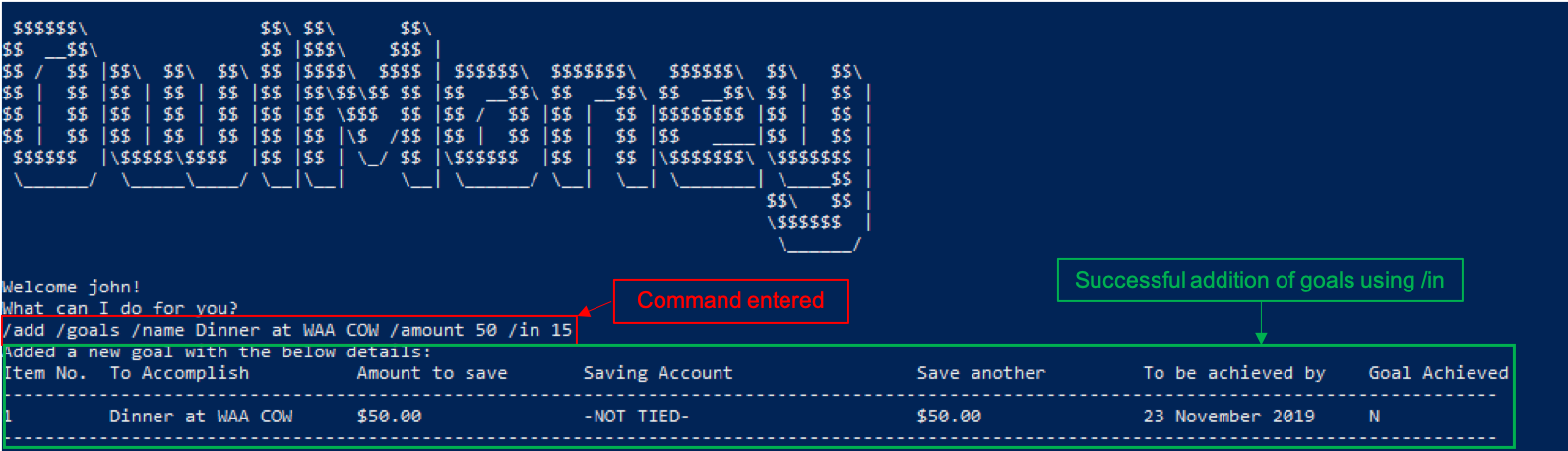
/add /goals /name Dinner at WAA COW /amount 50 /in 15
Adds a goal named Dinner at WAA COW which aims to save $50 in 15 days.
/in as date parameter-
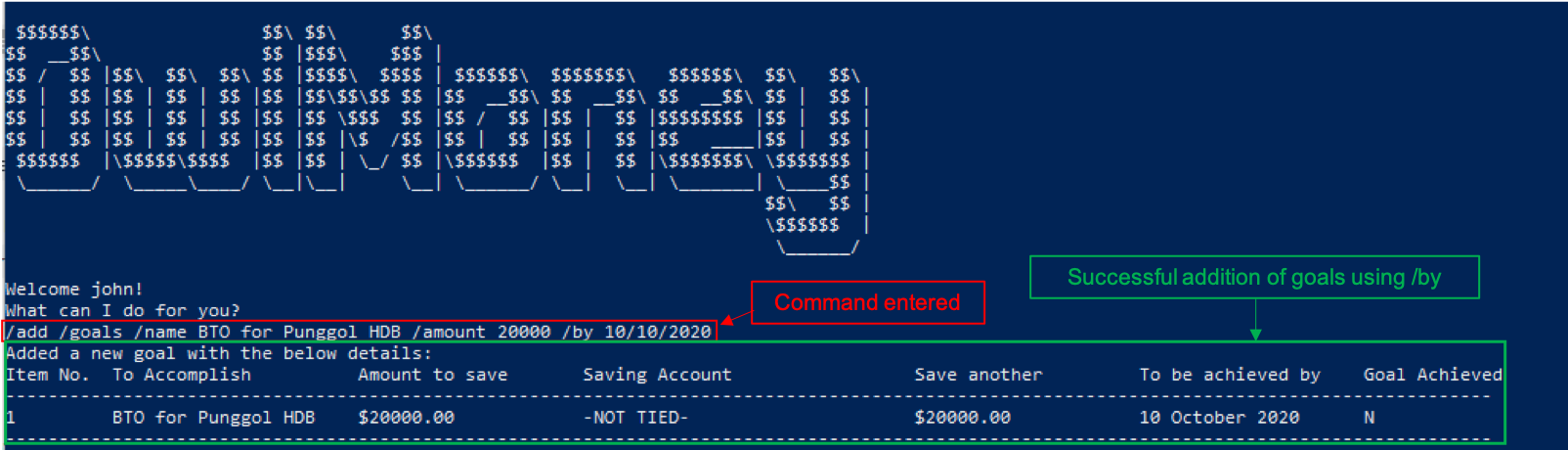
/add /goals /name BTO for Punggol HDB /amount 20000 /by 10/10/2020
Adds a goal named BTO for Punggol HDB which aims to save $20000 by 10/10/2020.
/by as date parameter-
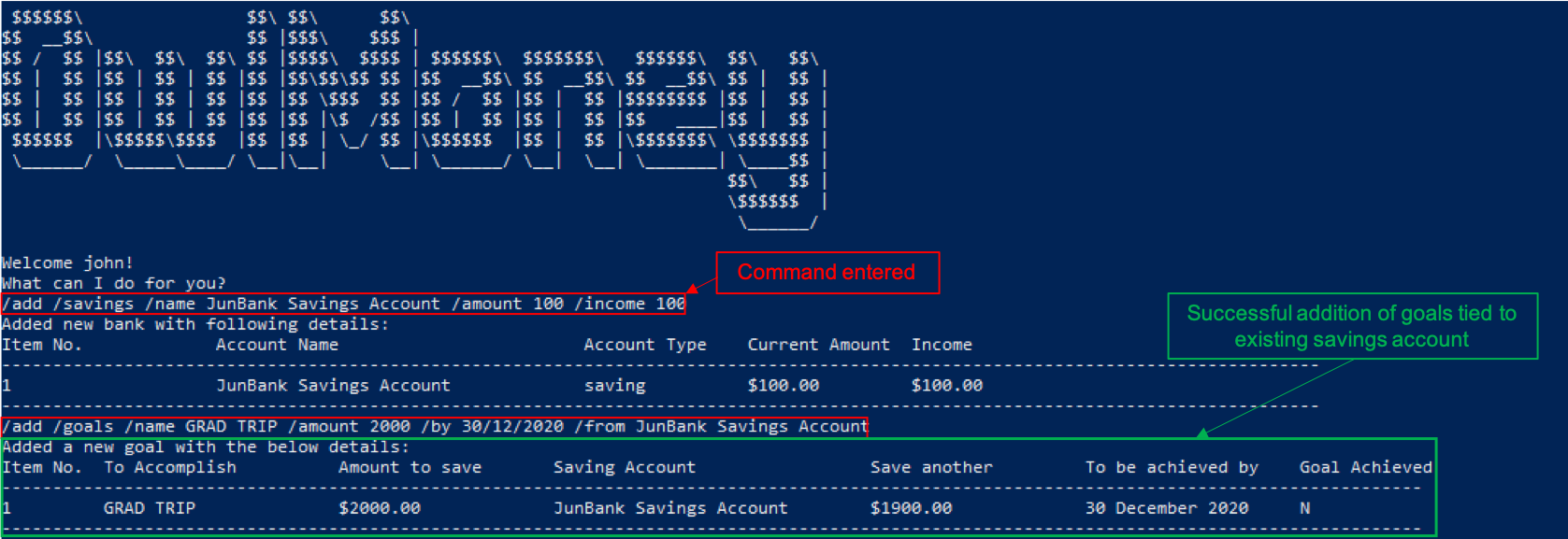
/add /goals /name GRAD TRIP /amount 2000 /by 30/12/2020 /from JunBank Savings Account
Adds a goal named GRAD TRIP which aims to save $2000 by 30/12/2020 and ties it to a savings account named JunBank
Savings Account.
/from parameterEditing financial goals /edit /goals
Made changes to one of your goals? Amend it easily with our edit feature!
Command Syntax
/edit /goals /name GOAL_NAME [/newname GOAL_NAME] [/amount AMOUNT] [/in DAYS] [/by DATE] [/from ACCOUNT_NAME] [/mark 1]
|
At least one of
Untie your currently linked goals with the same ACCOUNT_NAME that you link to using |
Example
-
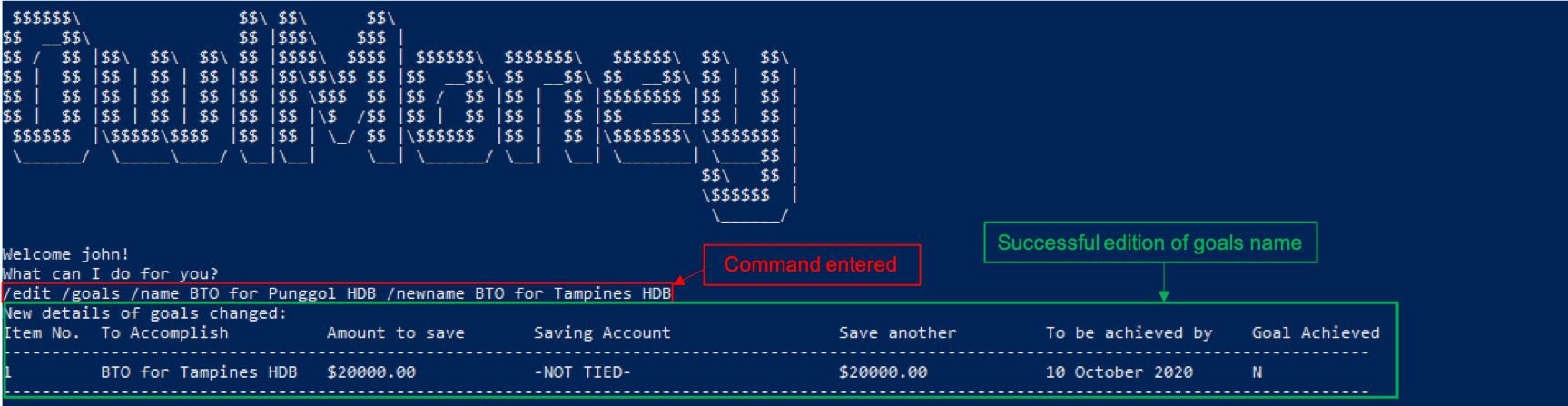
/edit /goals /name BTO for Punggol HDB /newname BTO for Tampines HDB
Edits the name of the goal from BTO for Punggol HDB to BTO for Tampines HDB.
/edit /goals /name and /newname-
/edit /goals /name BTO for Tampines HDB /amount 27500
Edits the goal of BTO for Tampines HDB to a new date of 11/11/2021 and amount to $27500.
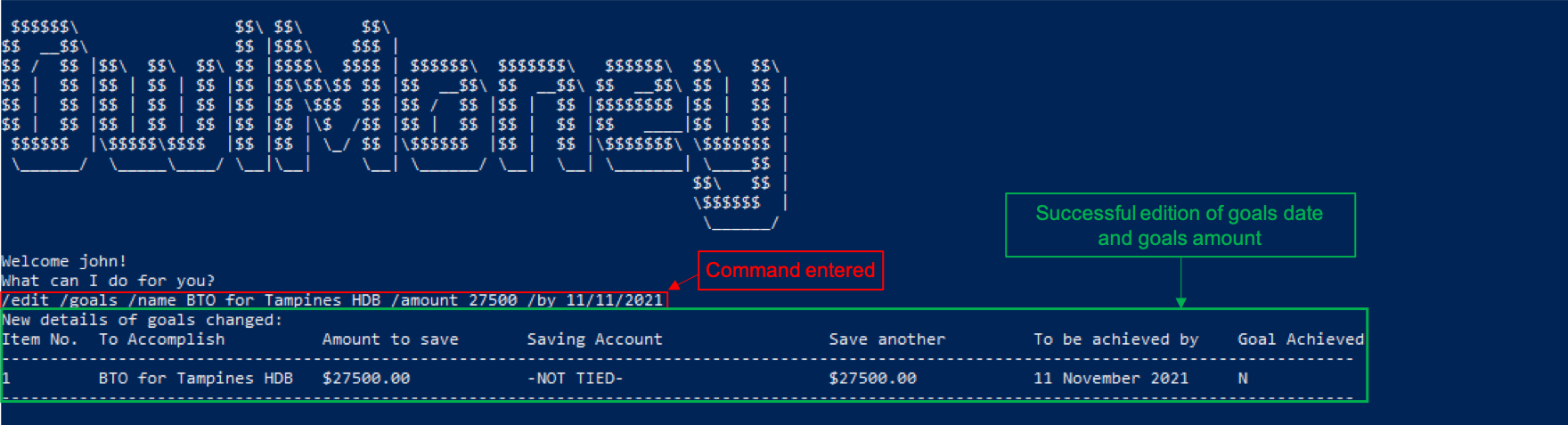
/edit /goals /name with /by and /amount|
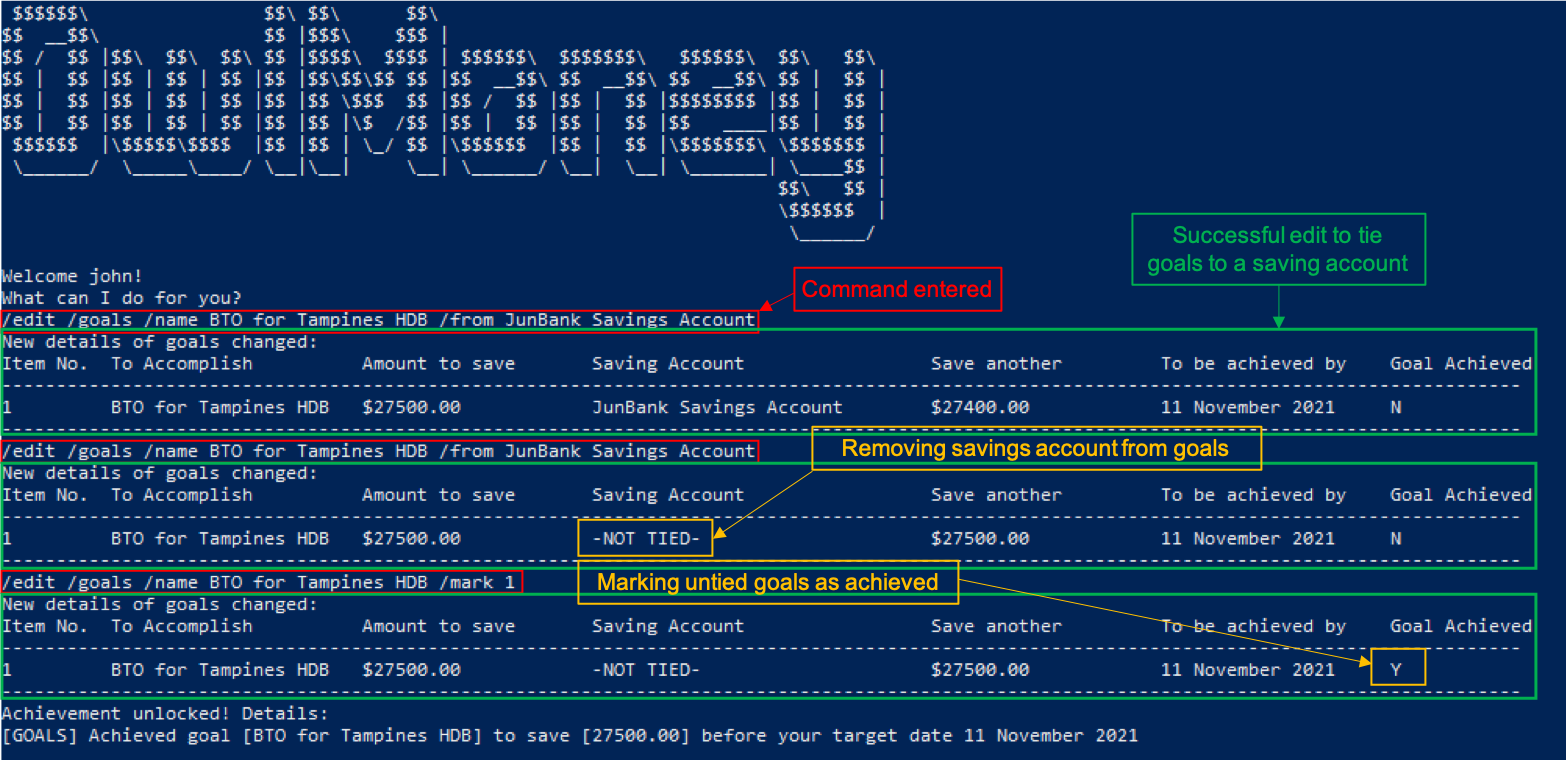
You can also add a savings account using the edit feature if your existing goal has no account linked to it. |
-
/edit /goals /name BTO for Tampines HDB /from JunBank Savings Account
Edits the savings account tied to BTO for Tampines HDB to JunBank Savings Account.
-
/edit /goals /name BTO for Tampines HDB /from JunBank Savings Account
Change your current goal to an un-tracked goals.
-
/edit /goals /name BTO for Tampines HDB /mark 1Marks un-tracked goals as done.
Deleting financial goals /delete /goals
Are your goals not relevant to you anymore?
Or achieved your goal? You can safely delete them!
Command Syntax
/delete /goals /name GOAL_NAME
Example
-
/delete /goals /name BTO for Tampines HDB
Deletes a goal named BTO for Tampines HDB.
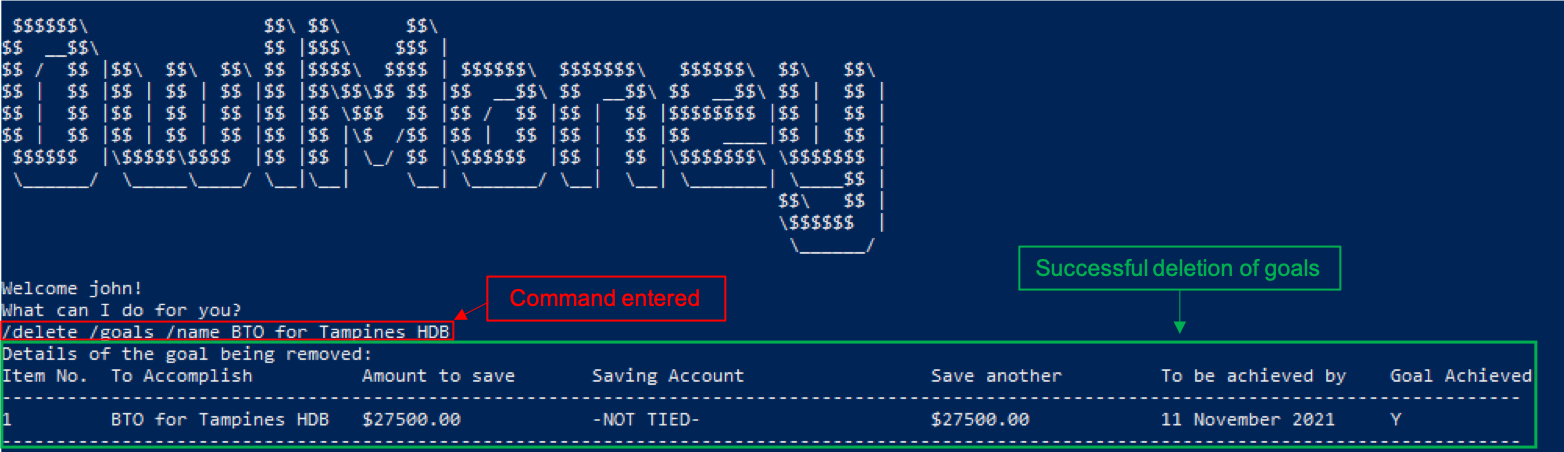
/delete /goals /nameContributions to Developer Guide
Listed below are some elaborations on the implementation of |
Goals Package Class Diagram
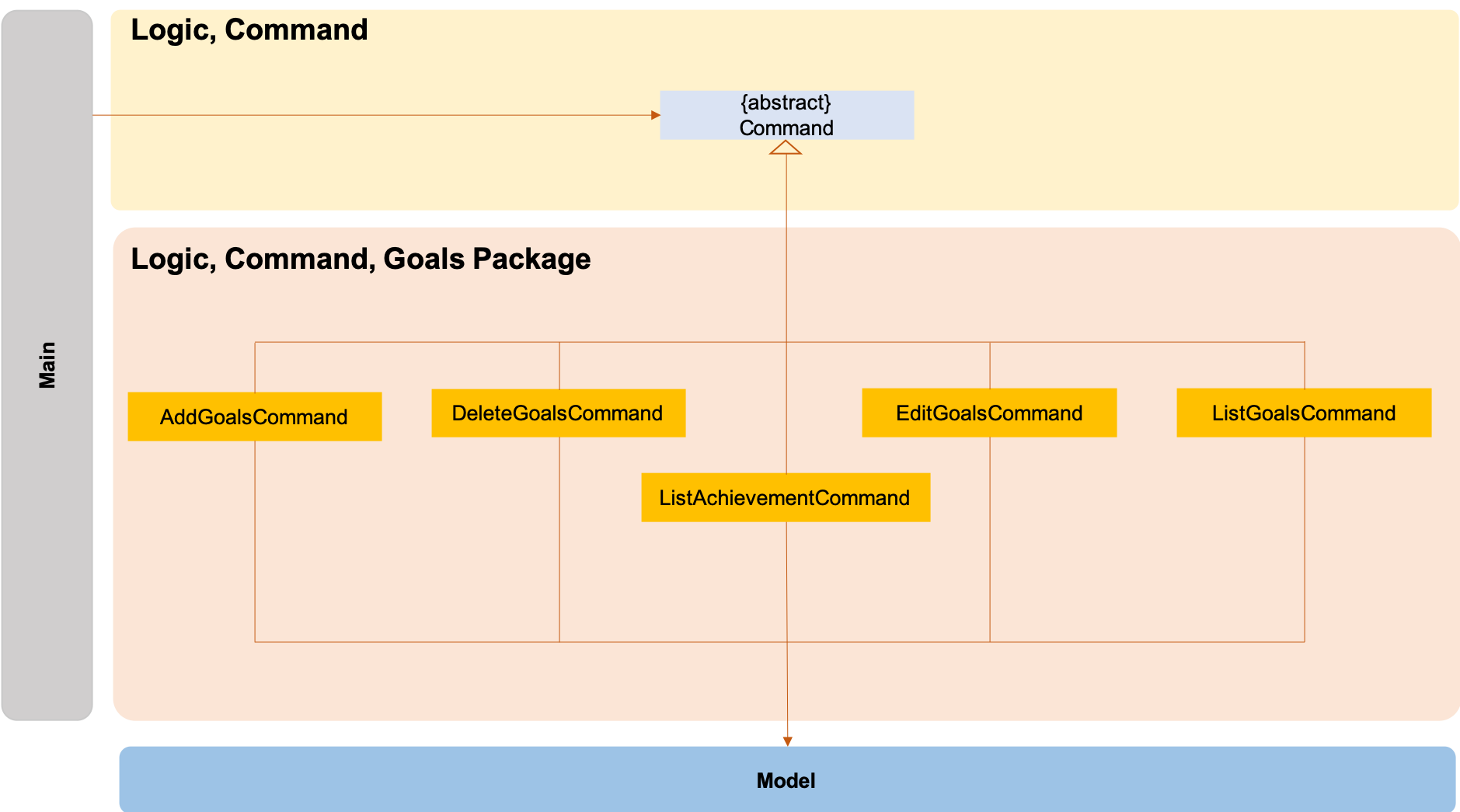
The logic.command.goals package consist of Goals classes with the following features:
-
Add
-
Edit
-
Delete
-
List
Main will call the specific Goal command class that will construct the required parameters before calling the
Profile class in Model to execute.
Adding Goals
The /add /goals feature allows users to add in any financial goals they have in mind to achieve for their future
plans.
This also aims to encourage users who have yet to have savings to start saving and track their goals.
Current Implementation
The current implementation of adding goals allows users to either manually track their goals or track via an existing
saving account. Also, the /amount parameter that users specify should be the total amount they wish to
have in their savings account.
The reason for providing these two options to users is that we consider that some users may prefer to do manual tracking
while others would prefer tracking them using an existing savings account.
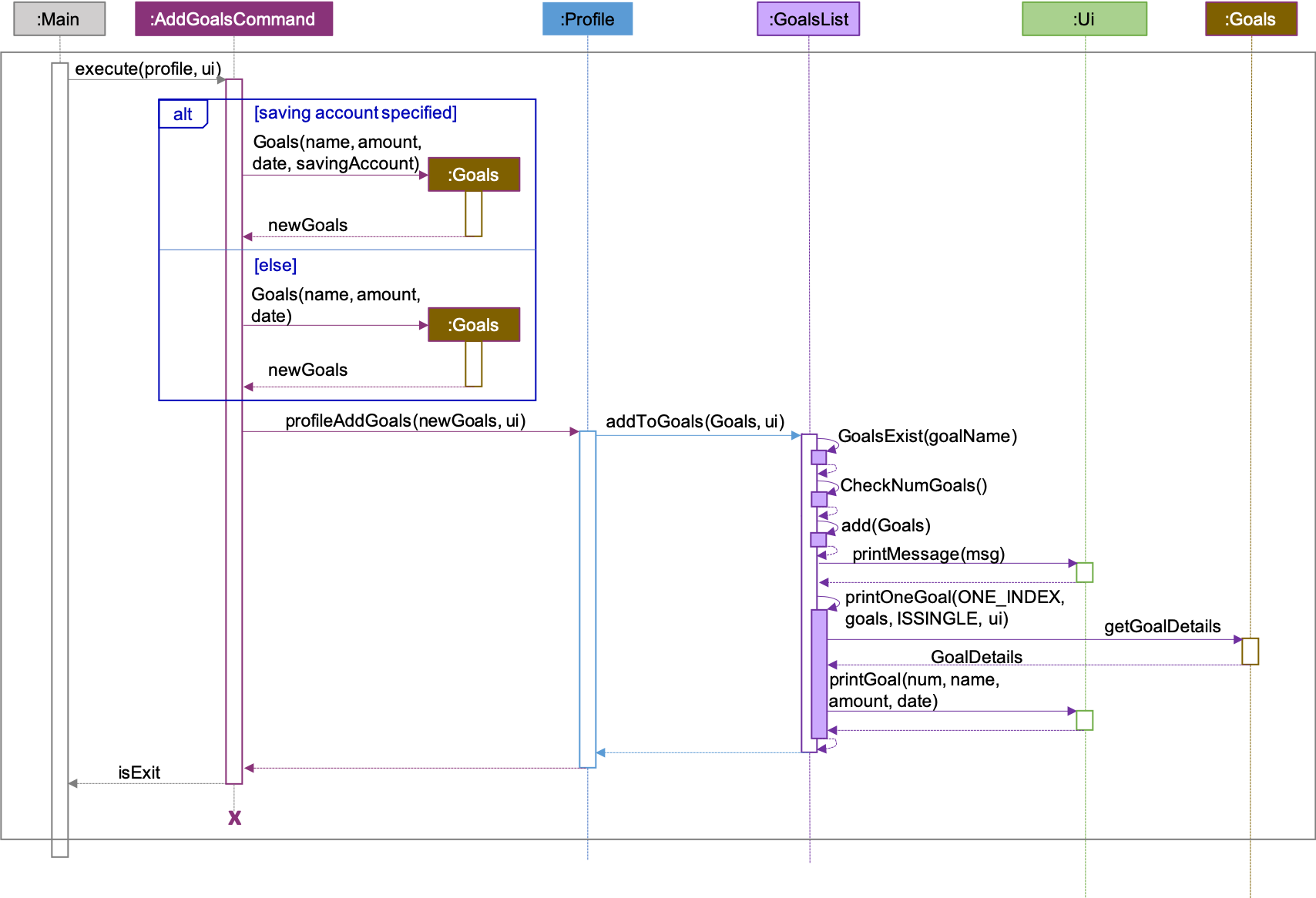
| The sequence diagram presented above is assumed to be a valid command which will produce a successful result. |
The sequence diagram presented above depicts the interaction between the Logic and Model component for running
AddGoalsCommand.
The AddGoalsCommand requires a minimum of 3 and up to a maximum of 4 inputs:
-
Goal name
-
Intended amount to save
-
Date they wish to achieve the goal by
-
OPTIONAL input:
-
Savings Account Name
-
When the user executes the AddGoalsCommand, the following steps are taken by the application:
-
When
AddGoalsCommandis executed, a new goal object is created with the provided inputs. -
After creation of the goal object is created, the
AddGoalsCommandwill invoke the methodprofileAddGoals. -
Within the invocation of
profileAddGoals, a method namedaddToGoalswill be invoked to add the new goal object to an ArrayList containing all goals objects. -
Once invoked,
addToGoalswill perform the following checks:-
Checks if goal name specified is unique among all goals in the existing list through the method of
goalsExist -
If a savings account was specified, it will check for if the amount of money in the account is lesser than the goals amount specified
-
Checks for the size of goals list through the method of
CheckNumGoals
-
AddGoalsCommand will throw an error if the above check fails.
|
-
After passing the above checks,
addToGoalswill add the new goals object into the existing list containing all goals objects. -
Once the goal object has been added, the details of the new goal object will be displayed to inform the user of the successful addition of the goal object.
Design Considerations
This section describes the various design considerations taken when implementing the /add /goals feature.
Aspect: Choice of whether to allow tying of savings account to a goals
| Approach | Pros | Cons |
|---|---|---|
1. Allowing the option of tying of savings account |
|
|
2. Disallow tying of savings account |
|
|
Approach 1 was taken after serious consideration and weighing out the pros and cons.
Firstly, the original intention of goals feature is to model real-life implementation of having goals,
encourages users to save and enable an easy yet convenient way of tracking on status of goals.
Although it may increase coupling and dependencies, the implementation of goals evidently shows that the pros
outweigh the cons despite these trade-offs.