1. Introduction
I am Terence, currently pursuing a degree in Information Security at the National University of Singapore (NUS). This portfolio documents my contributions towards OwlMoney for the module CS2113T Software Engineering & Object-Oriented Programming. It aims to demonstrate the theoretical and practical knowledge I have gained in this module over the semester.
2. About the Project
My team ( Tan Kian Ming Brian, Mong Zheng Wei, Shamus Neo Zhi Kai, Valerie Tan Yi Jia ) and I were tasked with enhancing the basic command line interface (CLI) personal assistant, Duke, for our software engineering project. We choose to morph it into a command line financial tracker called OwlMoney. This enhanced application is designed to assist undergraduates and fresh graduates to track and manage their finances. OwlMoney provides a simple and minimalistic CLI that presents information in an organized manner. It is intuitive so that users who are unfamiliar with CLI can use it with ease.
My role was to design and write codes for the card feature, which allows users to track and manage
their credit cards. The following sections illustrate the enhancements in detail, and also the relevant
information that I have added to the user and developer guide with reference to the enhancements.
Note the following symbols and formatting used.
|
This symbol denotes information that you may want to take note of. |
|
This symbol denotes a tip that you may find useful when using our application. |
|
This symbol denotes a warning message which you need to be careful of when using our application. |
Additionally, you may also encounter the following text styles:
-
Commands, parameters, and file paths will be in this
format -
Important messages will be bold
3. Summary of Contributions
This section shows a summary of my contributions to the project in terms of features enhancement, project management, documentation, and other helpful contributions.
3.1. Features Enhancement
3.1.1. Features Implemented: Ability to Manage Credit Cards
-
What it does: The
cardfeature hasadd,delete,edit, andlistcommands which help users manage their credit cards. -
Justification: Due to the popularity of credit cards, many people including students have one. Because different cards provide different benefits, some people own several cards. This feature gives users the ability to manage their credit cards.
-
Highlights: In line with real credit cards, users will be able to set their monthly spending limits and rebates.
-
Credits: Collaborated with Mong Zheng Wei to implement the /edit function.
3.1.2. Features Implemented: Ability to Manage Credit Card Expenditures
-
What it does: Each
cardis able toadd,delete,edit, andlistcard expenditures which helps users manage their credit card spending. -
Justification: Many people enjoys the convenience of credit cards that allows them to purchase things on credit and making payment at the end of the month. In addition, most credit cards also have benefits such as reward points or rebates. This feature will allow users to track and manage their credit card expenditures on each of their cards.
-
Highlights: In line with real credit cards, users will have to abide by their monthly card limit when adding expenditures. When a particular card has reached its monthly limit, the user will no longer be able to add any expenditures to the card for that particular month.
-
Credits: Collaborated with Mong Zheng Wei to implement the
addandlistcard expenditures function.
3.1.3. Features Implemented: Ability to Manage Credit Card Bills
-
What it does: Each
cardis able toaddanddeletecredit card bill payment to their savings account, so that users can keep track of their monthly credit card bill in their savings account expenditures. -
Justification: At the end of every month, users are expected to pay their credit card bills. Thus, this feature will allow users to keep track of their monthly credit card bills and rebates in their savings account.
-
Highlights: When making a credit card bill payment, the credit card rebates will automatically be deposited back to the user’s savings account to reflect the rebates earned for the particular month.
-
Credits: Collaborated with Tan Kian Ming Brian to move the credit card transactions into
bankexpenditureanddeposit. I had to edit, write additional, and use some of his methods in order to integrate my credit card bill expenditures with his bank expenditures.
3.3. Other Contributions
3.3.1. Project Management
-
Managed the team’s issue tracker to ensure that issues are closed within deadlines.
-
Helped schedule, review, and merge various Pull Requests (PRs) to minimize merge conflicts and regressions.
-
Organised and coordinated team meetings.
3.3.2. Additional Codes
-
Design and wrote the initial Parser class (ParseCommand, ParseType, ParseRawData) with contributions from everyone ( Tan Kian Ming Brian, Mong Zheng Wei, Shamus Neo Zhi Kai, and Valerie Tan Yi Jia ). These Parser classes are used by all commands to help parse keywords and parameters from a user command, regardless of the position of the parameters. (#66)
3.3.3. Team Contributions
-
Designed and implemented the abstract class
bank,parser,command, andtransactionwhich serve as the code base of the project with everyone ( Tan Kian Ming Brian, Mong Zheng Wei, Shamus Neo Zhi Kai, and Valerie Tan Yi Jia ). -
Implemented logging for OwlMoney while collaborating with everyone ( Tan Kian Ming Brian, Mong Zheng Wei, Shamus Neo Zhi Kai, and Valerie Tan Yi Jia ).
-
Contributed and wrote the sections for all parts of Features and Command Summary in the User Guide (UG) while collaborating with everyone ( Tan Kian Ming Brian, Mong Zheng Wei, Shamus Neo Zhi Kai, and Valerie Tan Yi Jia ).
-
Contributed and wrote the sections for all part of Design, Implementation, Product Scope, User Stories, Use Cases, and Instructions for Manual Testing in the Developer Guide (DG) while collaborating with everyone ( Tan Kian Ming Brian, Mong Zheng Wei, Shamus Neo Zhi Kai, and Valerie Tan Yi Jia ).
-
Helped team members debug issues related to parser class and also performed regression testing of their codes.
3.3.4. Documentation
-
Wrote the initial set of User Stories and Use Cases for the Developer Guide.
-
Vetted and resolved User Guide and Developer Guide errors.
4. Contributions to the User Guide
I wrote various sections of the user guide, including sections related to the card function. The following contains
an excerpt from our OwlMoney
User Guide,
showing additions that I have made for the card function.
4.1. Credit Card Management
In this section, you’ll be introduced to commands and parameters that help you to manage your credit cards and expenditures associated with it in OwlMoney.
Below is a list of command parameters that you can expect to use for the commands in this section.
Parameter |
Description |
Acceptable Range of Values |
|
Indicates the name of the credit card. (e.g. POBB Everyday Card) |
Take note that there is a maximum of 30 character limit. |
|
Indicates the name of the savings bank account. (e.g. JunBank Savings Account) |
Take note that there is a maximum of 30 character limit. |
|
Indicates the month and year the expenditure was made. (e.g. 10/2019) |
|
4.1.1. Credit Card Bill Management Commands: /cardbill
4.1.1.1. Adding Credit Card Bill to Savings Account /add /cardbill
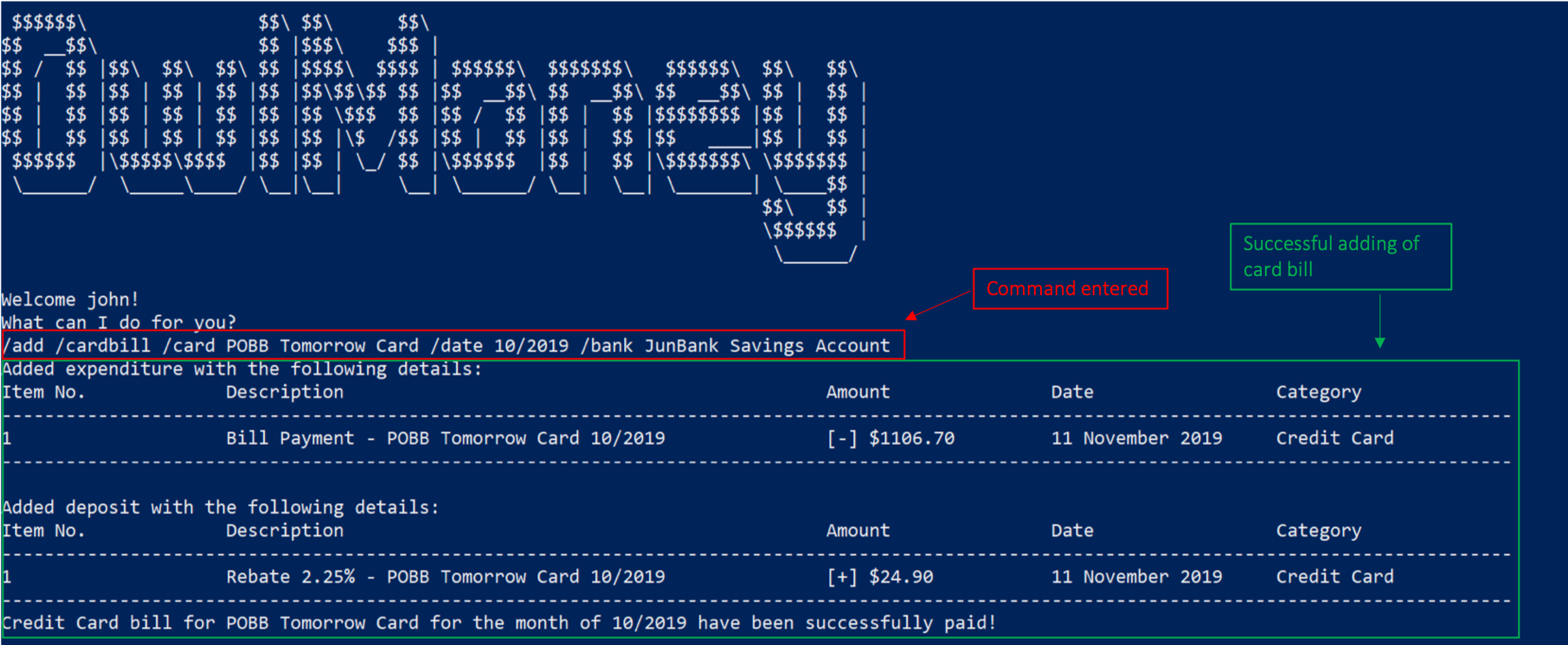
Charge your credit card monthly bill to your savings account! This will add a credit card bill expenditure and also deposit the monthly rebate to your savings account.
Command Syntax
/add /cardbill /card CARD_NAME /date YEARMONTH /bank ACCOUNT_NAME
|
The credit card bill expenditure and rebates deposit will be reflected in the savings account dated today. Rebates will be calculated based on the current credit card rebate, no matter which month the credit card transaction is from. |
Example
-
/add /cardbill /card POBB Tomorrow Card /date 10/2019 /bank JunBank Savings Account
Adds a credit card bill expenditure dated today to JunBank Savings Account with total card expenditures from POBB
Tomorrow Card in the month and year of 10/2019.
Rebates for the month will also be deposited back to JunBank Savings Account.
/add /cardbill.4.1.1.2. Deleting Credit Card Bill from Savings Account /delete /cardbill
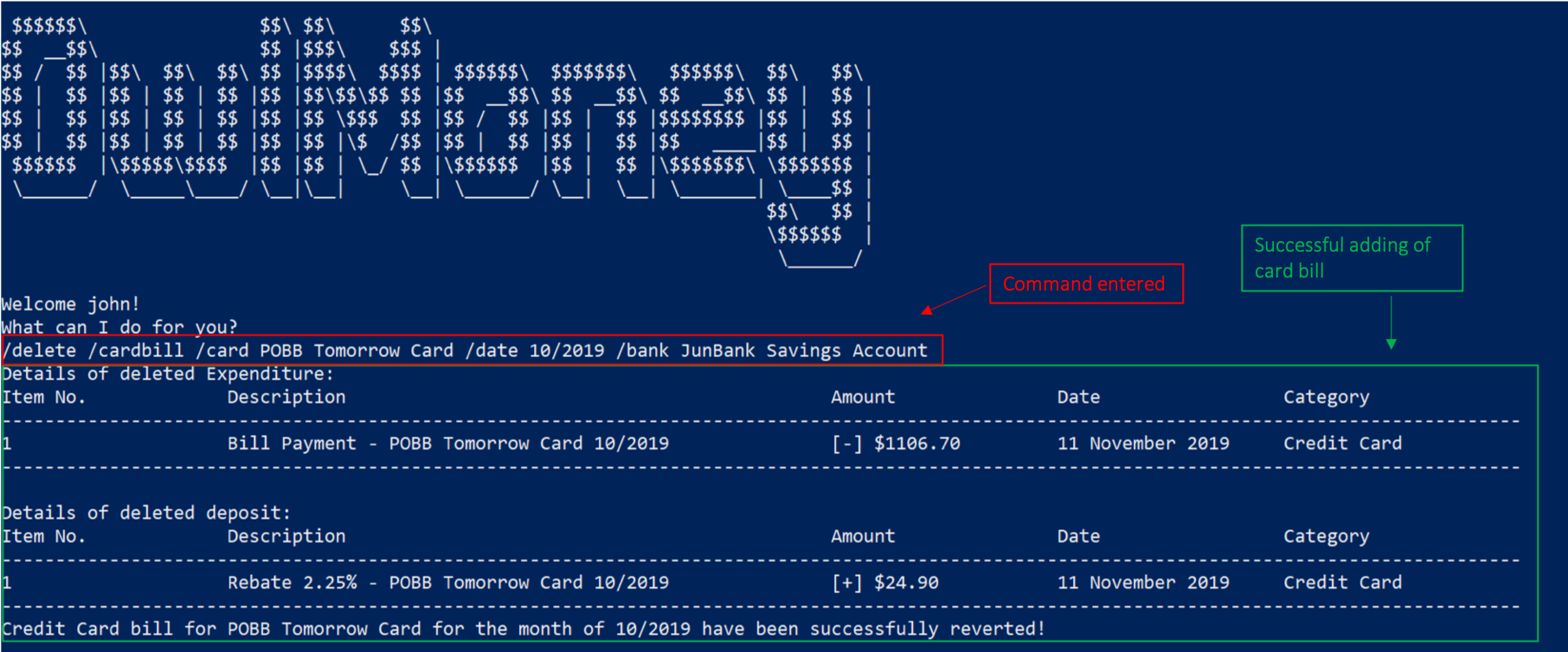
Made a mistake in charging of credit card bill or decided to add more card transaction for an already paid month? You can delete your credit card bill, which will delete the bill expenditure and rebate deposit from your savings account!
Command Syntax
/delete /cardbill /card CARD_NAME /date YEARMONTH /bank ACCOUNT_NAME
|
Do not use the |
Example
-
/delete /cardbill /card POBB Tomorrow Card /date 10/2019 /bank JunBank Savings Account
Deletes credit card bill expenditure and rebate deposit from JunBank Savings Account. All credit card
expenditures from 10/2019 will be marked as unpaid from POBB Tomorrow Card.
/delete /cardbill.5. Contributions to the Developer Guide
I wrote various sections of the developer guide, including sections related to the card function. The following
contains an excerpt from our OwlMoney
Developer Guide
, showing additions that I have made for the card function.
5.1. Card Command Class Diagram
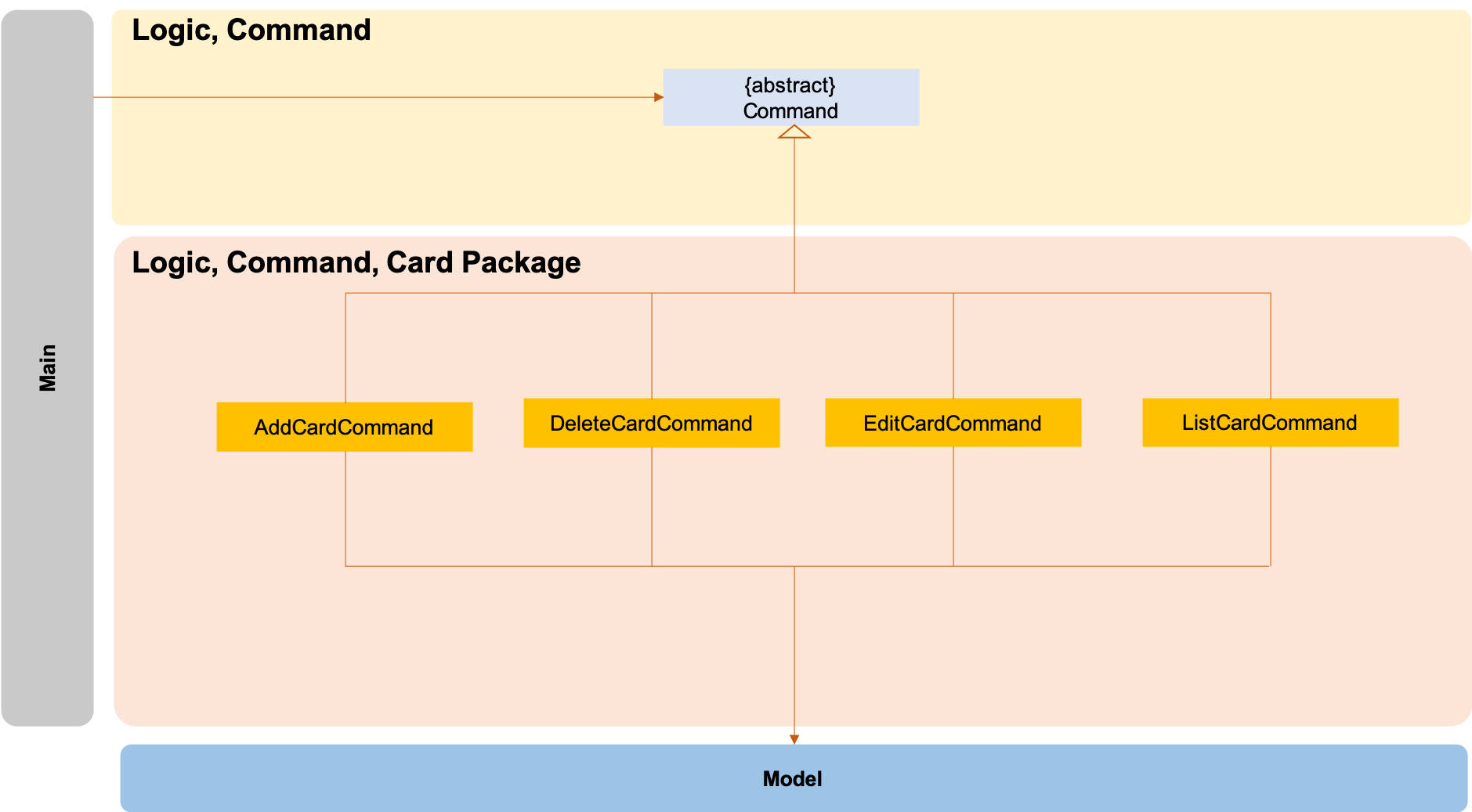
The logic.command.card package consists of Card classes with the following features:
-
Add
-
Edit
-
Delete
-
List
Main will call the specific Card command class that will construct the required parameters before calling the
Profile class in Model to execute.
5.2. Delete Card Command Sequence Diagram
The /delete /card feature aims to help users remove credit cards that they no longer wish to store in their
profile. This could be because the credit card has expired and they no longer wish to keep track of it.
5.2.1. Current Implementation
The current implementation of deleting card allows users to remove a credit card from their profile by entering
the credit card name. Because we allow entering of card name that is case and trailing whitespace insensitive, users do
not need to worry about typing the exact card name. Although each credit card has it’s own Universal Unique Identifier
(UUID), it is not exposed to the users because UUID is a string of 32 alphanumeric characters and it will be very
unintuitive for them to enter it into the command.
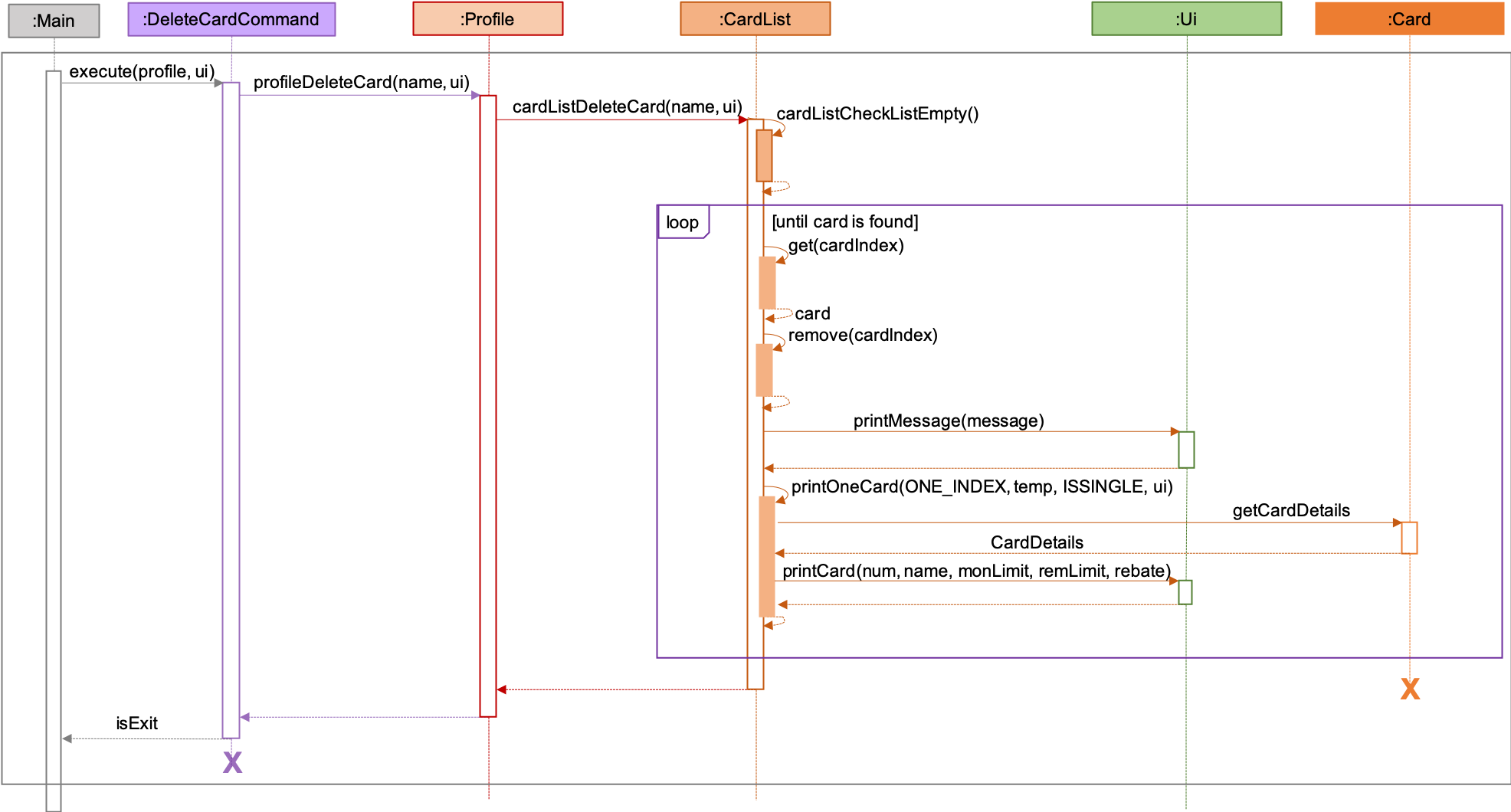
| The sequence diagram presented above is assumed to be a valid command which will produce a successful result. |
The above sequence diagram depicts the interaction between the Logic and Model component for running
DeleteCardCommand.
The DeleteCardCommand requires 1 input:
-
Credit Card’s name.
When the user executes the DeleteCardCommand, the following steps are taken by the application:
-
When
DeleteCardCommandis executed, it will invokeprofileDeleteCard. -
Within the invocation of
profileDeleteCard, a method namedcardListDeleteCardwill be invoked. -
Once invoked,
cardListDeleteCardwill perform the following checks:-
Check the Arraylist containing all card objects is not empty through the method cardListCheckListEmpty .
-
Check for the existence of the card with the specified name.
-
cardListDeleteCard will throw an error if any of the above checks fail.
|
-
After passing the above checks,
cardListDeleteCardwill delete the card with the specified name from the Arraylist. -
Once the card object has been deleted, the details of the deleted card object will be displayed to inform the user of the successful deletion of the card object.
5.2.2. Design Considerations
This section describes the various design considerations taken when implementing the /delete /card feature.
Aspect: Choice of using which parameters for the deletion of credit cards
| Approach | Pros | Cons |
|---|---|---|
1. Allowing the deletion of credit cards by specifying the card name (case and trailing whitespace insensitive). |
|
|
2. Allowing the deletion of credit cards by specifying the exact card name (case and trailing whitespace sensitive). |
|
|
3. Allowing the deletion of credit cards by specifying the card’s order number. |
|
|
4. Allowing the deletion of credit cards by specifying the card’s UUID. |
|
|
After careful consideration and weighing of pros and cons, we decided to use approach 1.
Although approach 1 is the hardest to implement, it is the most intuitive for users because they do not need to memorise unnecessary order numbers, random 32 characters alphanumeric string, or the exact name. In addition, we have decided for cards to have case insensitive names, so that users cannot add cards with the same name but different cases. Therefore, since card names are case insensitive, it makes sense for users to expect case insensitive names in the command.