Tan Kian Ming Brian - Project Portfolio for OwlMoney
Hello there I am Brian. I am a current student from National University of Singapore. I am currently pursuing a degree in Information Security.
I have collaborated with Shamus Neo Zhi Kai, Mong Zheng Wei, Tan Wee Theng Terence and Valerie Tan Yi Jia to work on a project for the module CS2113T (Software Engineering & Object-Oriented Programming).
About the project
My team and I were tasked to enhance a basic command line interface desktop personal assistance, named Duke, for our project. We have decided to morph it into a finance tracker, which mainly targets undergraduates and fresh graduates, called OwlMoney. This morphed product allows the users to keep track of their finances, while also allowing them to set goals for themselves to achieve.
My role was to design and implement the add, edit, delete and list functions for savings,
expenditures, deposit and recurring bank expenditures (recurbankexp).
The following sections illustrates these implementations in more detail, as well as the relevant documentation
I have added to the User Guide and Developer Guide in relation to these implementations.
In addition to this, I have aided Shamus in implementing investment and bonds.
Note the following symbols and formatting used.
|
This symbol denotes information that you may want to take note of. |
|
This symbol denotes a tip that you may find useful when using our application. |
|
This symbol denotes a warning message which you need to be careful of when using our application. |
Additionally, you may also encounter the following text styles:
-
Commands, parameters, and file paths will be in this
format -
Important messages will be bold
Summary of contributions
This section shows the summary of my contributions to the project which include the coding, documentation and other helpful contributions.
Features implemented: I have implemented the ability to add, edit, delete and list Savings account
-
What it does: The
add,edit,deleteandlistcommands on asavingsaccount allows the user to manage all savings accounts in the profile. -
Justification: The savings account is a common account that many users own. Additionally, many transactions are performed in this account. Because of these reasons, the implementation of the
Savingsaccount will cater to a large number of users. -
Highlights: The bank account also keeps track of the user’s monthly income so that it can automatically be credited into the
Savingsaccount. This prevents errors such as forgetting to add a deposit for the monthly income. -
Credits: A majority of this class inherits from the parent class
bankwhich was collaborated by Shamus, Zheng Wei, Terence and Valerie.
Features implemented: I have implemented the ability to add, edit, delete and list transactions, which consists of
expenditures, deposit, and recurbankexp.
-
What it does: The
add,edit,deleteandlistcommands on transaction objects allows the user to manage all transactions within the bank or card accounts. -
Justification: Transactions which are performed on a bank account will affect the amount of money in it. By implementing the transactions features, the user will be able to add any transactions which has been performed to the specified bank account. This enables the ability to track the user’s finances.
-
Highlights: This enhancement automatically adjusts the current amount in the bank automatically when a transaction is added, modified or deleted. This allows effective tracking of the user’s finances in the account without the need to manually edit the bank amount.
Features implemented: I have assisted Shamus to implement the investment account.
-
What it does: The investment account allows OwlMoney to be able to track investments and bonds that the user has.
-
Justification: Investments are common sources of income for many users, including our target users of fresh and undergraduates. By allowing them to track their investments, users are able to track more than just their savings
-
Highlights: This enhancement automatically credits the 6 month interest into the bank account. This allows effective tracking of the user’s investments while reducing errors from user input.
-
Credits: A majority of these features was done by Shamus. I assisted him when he had difficulties in implementing certain features.
Code contributed: [RepoSense], [Commits], [Pull Requests]
Other contributions:
-
Project Management:
-
Managed Issue tracker.
-
-
Enhancement made to existing features:
-
Fixed error in the Ui of the program. (Pull Request #152)
-
-
Documentation:
-
Community:
-
Reviewed the User Guide and Developer Guide of other groups.
-
Reported several bugs found in another team’s project, MisterMusik.
-
-
Team Collaboration:
-
Reported bugs on team member’s code. (Issue #138)
-
Collaborated with team members on other features. (Pull Request #74)
-
Designed the flow of how commands are executed. (Pull Request #64, #67)
-
Some parts of my code were referenced by my group members.
-
Resolved bugs in the program. (Pull Request #90)
-
Designed and implemented the abstract class
bank,parser,command, andtransactionwhich serve as the code base of the project with everyone (Shamus, Zheng Wei, Terence and Valerie) (Pull Request #64, #67). -
Implemented logging for OwlMoney while collaborating with everyone (Shamus, Zheng Wei, Terence and Valerie).
-
Contributions to the User Guide
The User Guide had to be updated to reflect the instructions on how to use the morphed product, OwlMoney.
The following is a portion of the User Guide which shows the commands for managing Savings, expenditures,
deposit and bankrecurexp.
Adding savings bank account /add /savings
Before you can add any expenditures, you will need to add a savings account first.
It’s easy to add a savings account!
Here’s how you can use the /add /savings command.
Command Syntax
/add /savings /name ACCOUNT_NAME /amount AMOUNT /income INCOME
|
A profile needs to be created first before you are eligible to add an account. A savings account is compulsory as most features in OwlMoney require it. There can only be a maximum of 7 savings account. |
Example
-
/add /savings /name JunBank Savings Account /amount 218.90 /income 2000
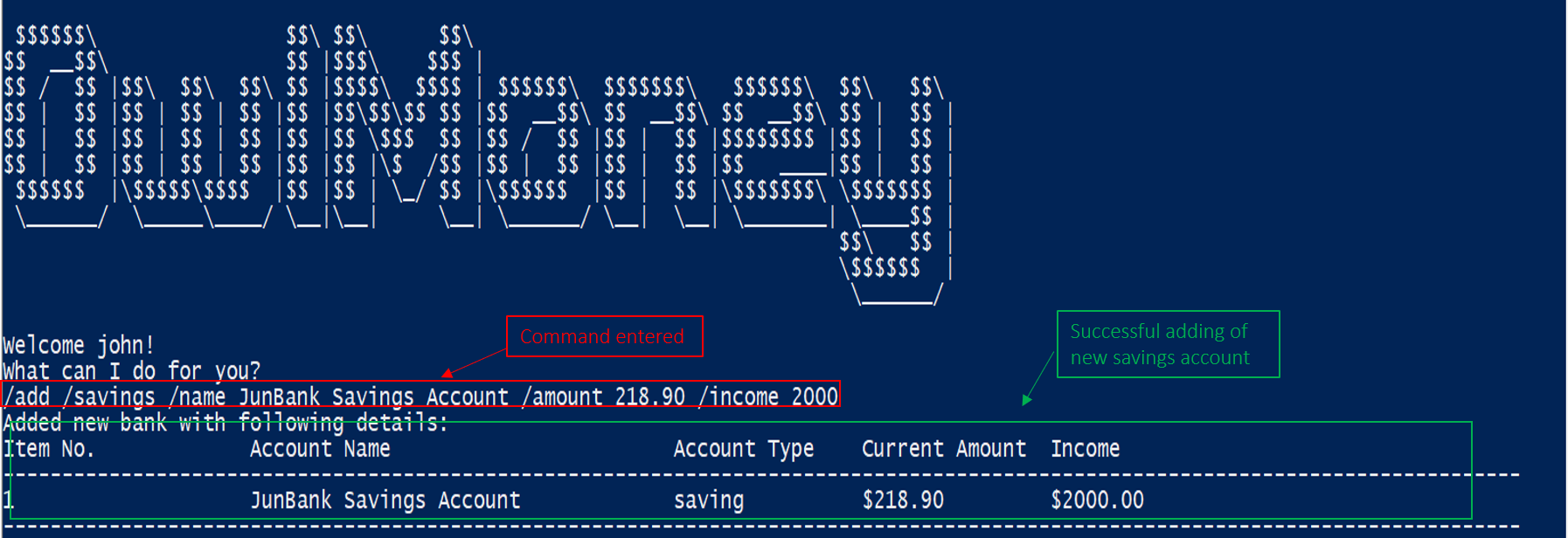
/add /savings.Adds a savings account named JunBank Savings Account which has an initial amount
of $218.90 inside with a monthly income of 2000 automatically credited into the account
every start of the month.
Adding expenditures for savings bank account /add /bankexpenditure
Spending is a daily affair and it is difficult to keep track of so many of them. Fret not!
OwlMoney allows you to keep track of your spending and categorise them as well!
Command Syntax
/add /bankexpenditure /amount AMOUNT /from ACCOUNT_NAME /date DATE /desc DESCRIPTION [/category CATEGORY]
|
An expenditure cannot be added to an investment bank account. |
Example
-
/add /bankexpenditure /amount 1.20 /from JunBank Savings Account /date 28/09/2019 /desc bubble tea /category
Dining
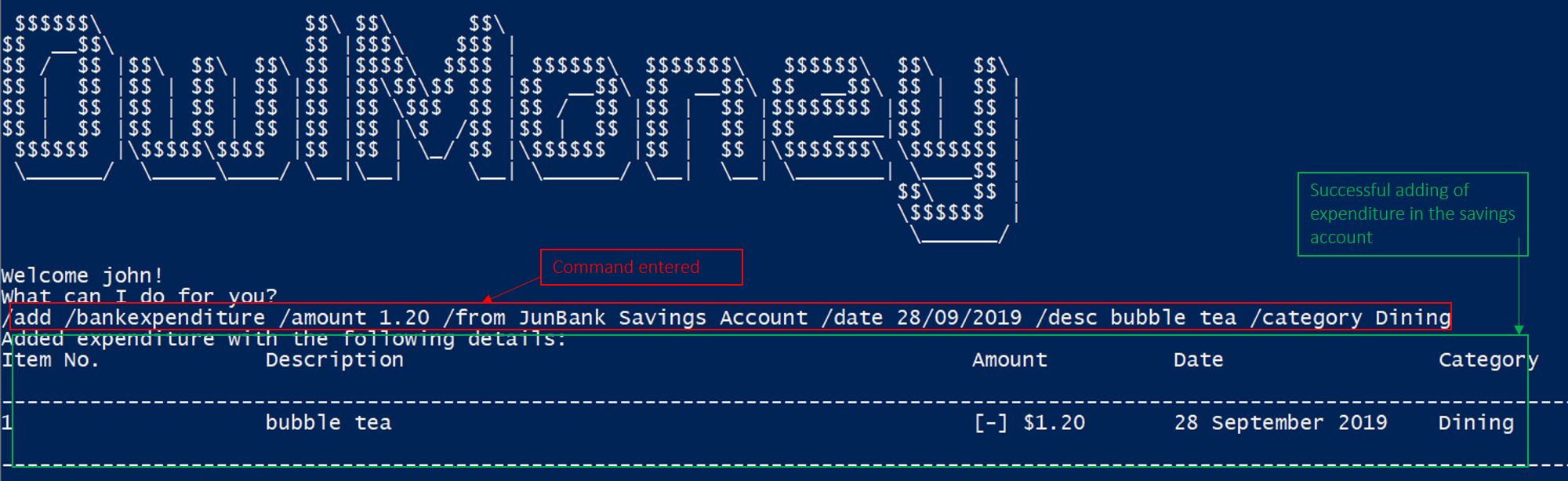
/add /bankexpenditure.Adds an expenditure that deducts from JunBank Savings Account dated on 28/09/2019 that costs $1.20 with
the description of bubble tea and category of Dining.
Adding deposit to savings bank account /add /deposit
Saved up some spare cash to deposit into your bank account? Record them here!
Command Syntax
/add /deposit /to ACCOUNT_NAME /amount AMOUNT /desc DESCRIPTION /date DATE
Example
-
/add /deposit /to JunBank Savings Account /amount 300 /desc FREELANCE WORK /date 10/10/2019
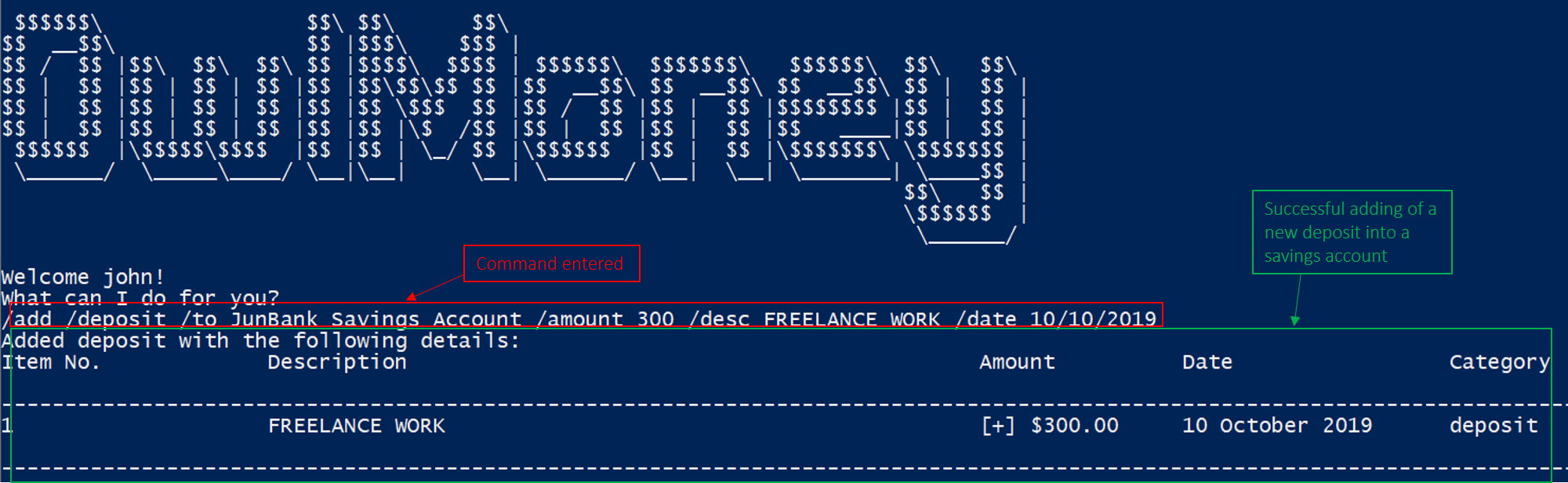
/add /deposit.Deposits $300 earned from FREELANCE WORK work into JunBank Savings Account.
Adding recurring expenditures /add /recurbankexp
Postpaid mobile plan bills that are consistent monthly? We can save you the hassle from adding them every month!
Command Syntax
/add /recurbankexp /amount AMOUNT /from ACCOUNT_NAME /desc DESCRIPTION [/category CATEGORY]
Example
/add /recurbankexp /amount 72.90 /from JunBank Savings Account /desc Telco Bills /category Bills
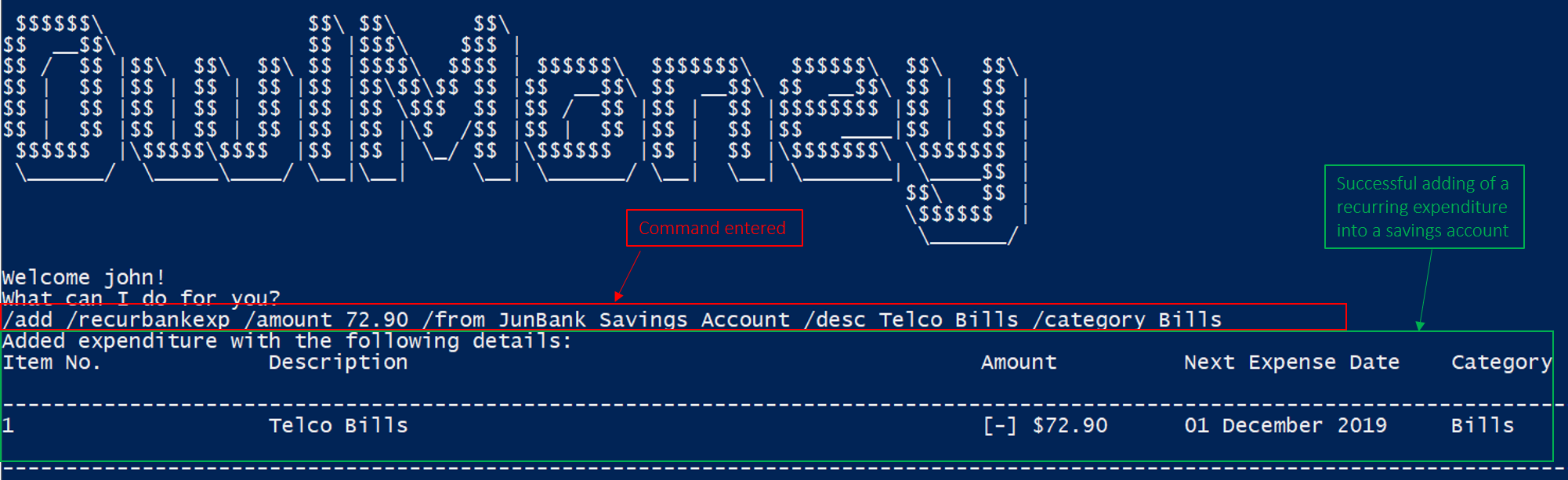
/add /recurbankexp.Adds a recurring expenditure that deducts $72.90 every 1st of the month to pay Telco Bills charged to JunBank
Savings Account categorised under the Bills category.
Contributions to the Developer Guide
The following section shows my contribution to the Developer guide for the Bank and Savings feature.
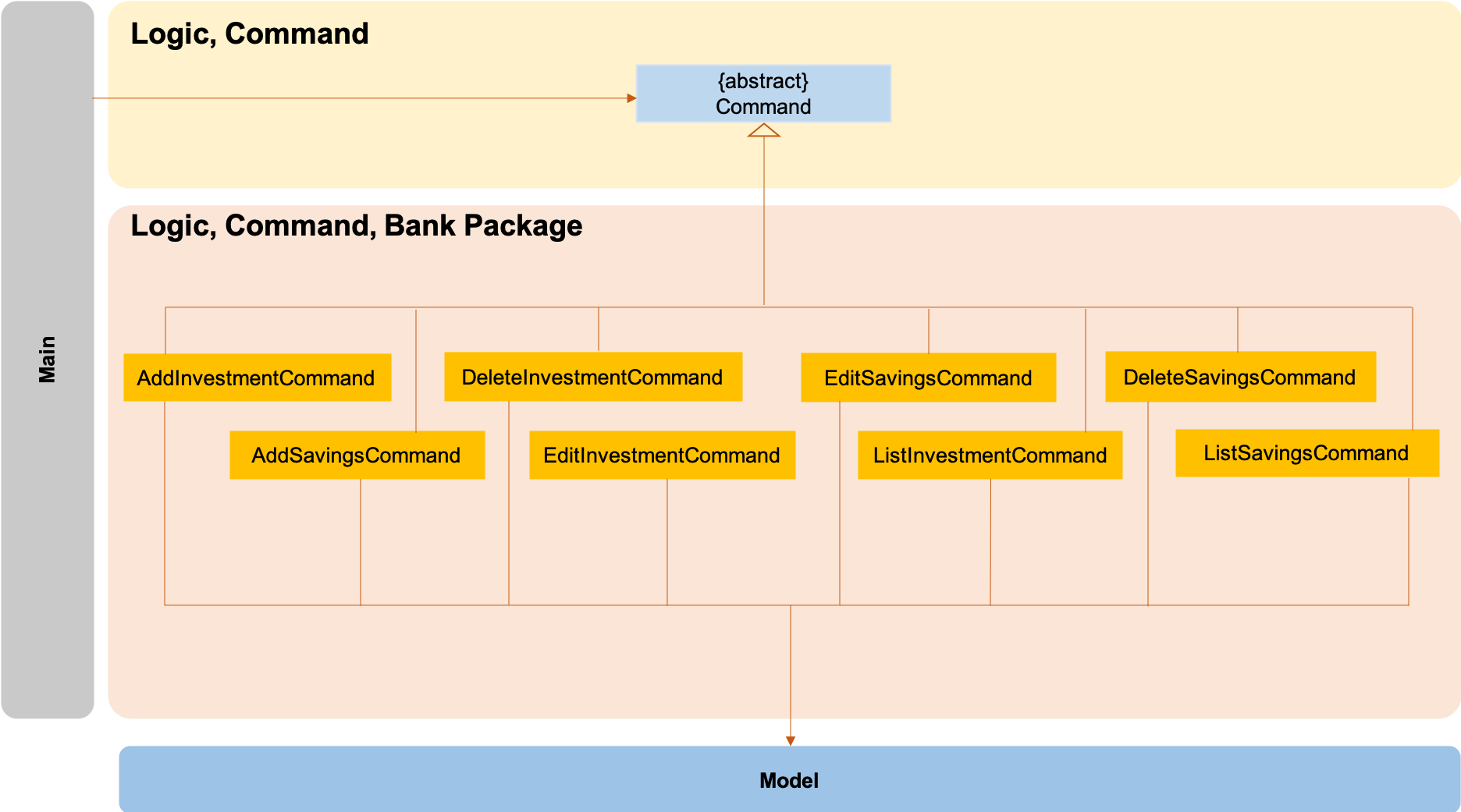
The logic.command.bank package consists of Savings and Investment classes which inherits from the Command class.
Both the Savings and Investments classes have the following common features:
-
Add
-
Edit
-
Delete
-
List
Main will call the specific Savings or Investment command class that will construct the required
parameters before calling the Profile class in Model to execute.
Adding Savings
The /add /savings feature aims to provide the user with the ability to add a new savings account into OwlMoney.
With this feature, the user will be able to start tracking their expenses.
Hence, allowing the user to track their monthly budget and save up effectively.
Current Implementation
The current implementation of adding a savings account requires 2 parameters; amount and income.
The ability to track the savings account is enhanced through monitoring the amount,
while also being able to update it through any income the user has.
Hence, the user will be able to control their spending effectively.
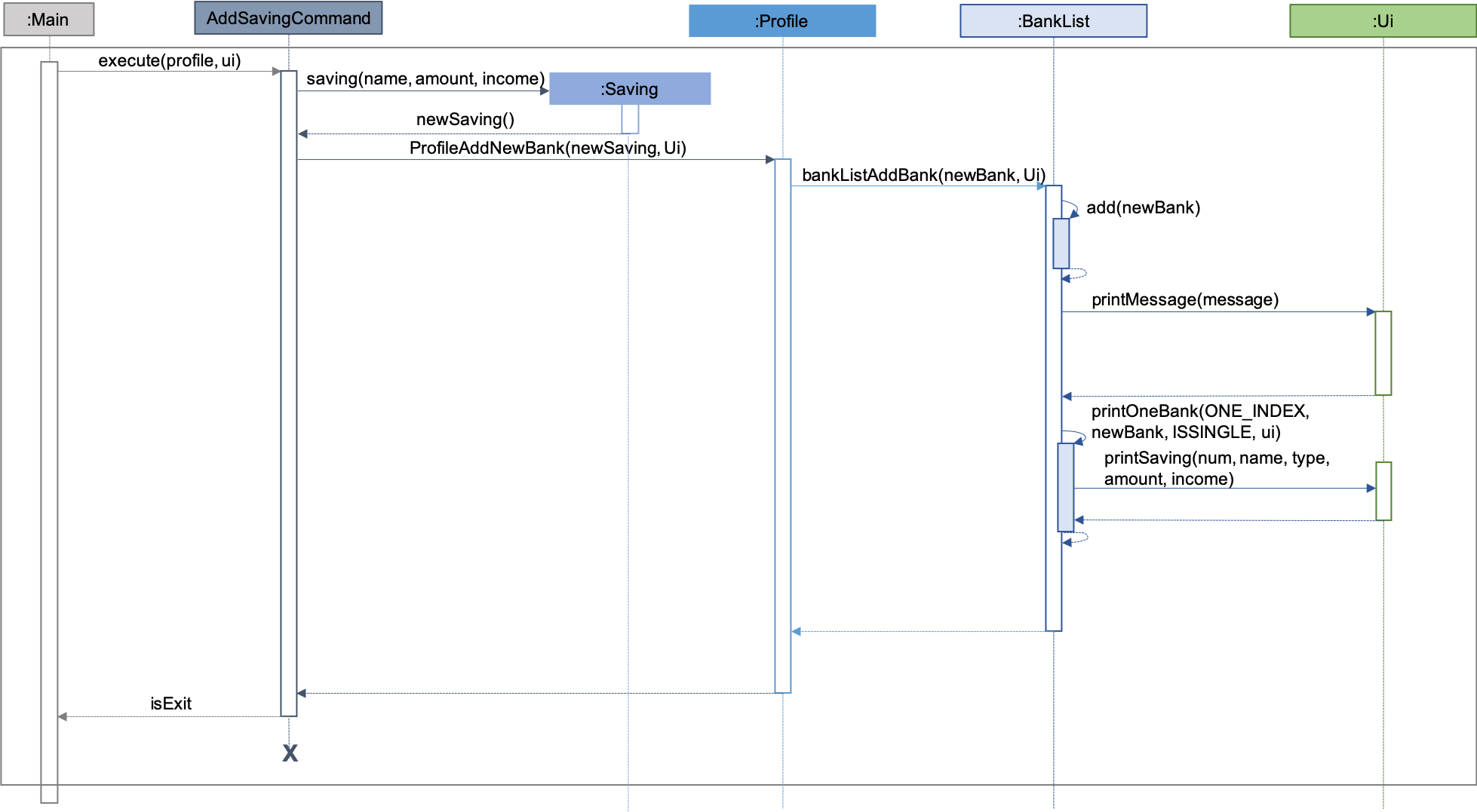
| The sequence diagram presented above is assumed to be a valid command which will generate in a successful result. |
The above sequence diagram depicts the interaction between the Logic and Model component for running
AddSavingsCommand.
The AddSavingsCommand requires 3 inputs:
-
Savings Account’s name
-
Amount
-
Income
When the user executes the AddSavingsCommand, the following steps are taken by the application:
-
When
AddSavingsCommandis executed, it creates a new savings object using the 3 inputs. -
After creating the savings object, the
AddSavingsCommandwill invoke the methodprofileAddNewBank. -
Within the invocation of
profileAddNewBank, a methodbankListAddBankwill be invoked to add the new savings object to an Arraylist containing all bank objects. -
Once
bankListAddBankis invoked, it will perform the following checks:-
Check if the bank name specified is unique among all bank accounts in the bank list through the method
bankAccountExists.
-
bankListAddBank will throw an error if the above check fails.
|
-
After passing the above checks,
bankListAddBankwill add the new savings object to the Arraylist which contains all bank objects. -
Once the savings object has been added, the details of the new savings object will be displayed to inform the user of the successful addition of the savings object.
Design consideration
This section describes the various design considerations taken when implementing the /add /savings feature.
Aspect: Choice of whether to set the account name as case-sensitive or case-insensitive
| Approach | Pros | Cons |
|---|---|---|
1. Case-insensitive name |
|
|
2. Case-sensitive name |
|
|
After weighing the pros and cons, approach 1 was taken.
By designing the name to be case-insensitive, it increases the user-friendliness of OwlMoney since bank names are commonly remembered without the exact capitalisation of letters. Also, in the event the user keys in a different capitalised character for the same bank, there is no need for the user to re-enter the command due to the bank account "not existing". Additionally, the case-sensitivity check can also be used with the Card function or with any other case-insensitive model or logic.