1. Overview
This portfolio documents my contributions towards OwlMoney for the module CS2113T Software Engineering & Object-Oriented Programming. It aims to demonstrate the theoretical and practical knowledge I have gained in this module over the semester.
2. Project: OwlMoney
OwlMoney is an application designed by a team of five members ( Tan Kian Ming Brian, Tan Wee Theng Terence, Shamus Neo Zhi Kai, Valerie Tan Yi Jia, and myself). It aims to assist undergraduates and fresh graduates to track and manage their finances conveniently and effectively - all in one place. OwlMoney provides a Command Line Interface (CLI) for the user to interact with. The commands used to interact with OwlMoney are designed to be simple and intuitive. Rest assured, you will be able to use OwlMoney with ease, even if you are unfamiliar with CLI.
The following 3 symbols will be used throughout the documentation which you may wish to pay attention to as it may contain important details:
|
This symbol denotes information that you may want to take note of. |
|
This symbol denotes a tip that you may find useful when using our application. |
|
This symbol denotes a warning message which you need to be careful of when using our application. |
Additionally, you may also encounter the following text styles:
-
Commands, parameters, and file paths will be in this
format -
Important messages will be bold
3. Summary of Contributions
Below are my contributions in terms of feature enhancements, project management, and documentation:
3.1. Features Enhancement
3.1.1. Enhancement Added: card Feature
-
What it does: Allows the users to maintain a list of credit cards that they own.
-
Justification: The
cardfeature work together with thecardExpenditurefeature and provides the user the capability of tracking their expenses for each credit card that they own. As such, provides the user with a convenient way to review their credit card expenses. -
Highlights: This enhancement involves adding several new commands to OwlMoney. As such it requires an understanding of the underlying architecture and the components
logic,modelandstorage. -
Credits: The implementation of
cardfeature was collaborated with Tan Wee Theng Terence, as there is a dependency between thecardandcardExpenditurefeatures.
3.1.2. Enhancement Added: find Feature
-
What it does: Allows the user to search for specific information such as transaction records, bank account and more.
-
Justification: It can be messy and tedious for the user to track and manage their finances after using OwlMoney for some time. This is because the user might have thousand of transactions record stored within OwlMoney. With the
findfeature, it allows the user to search and view specific transaction records with ease. -
Highlights: For this enhancement to be implemented, it depends on other features such as
card,bank, andtransaction. Therefore, the implementation offindfeature was challenging as it requires an in-depth analysis and understanding of other features.
3.1.3. Enhancement Added: transfer Feature
-
What it does: Allows the users to transfer funds from one bank account to another account.
-
Justification: It provides the user with great flexibility to transfer funds from one bank account to another bank account. This helps to simulate a realistic flow of funds between different accounts such as transferring money from saving account to investment account to invest.
-
Highlights: For this enhancement to be implemented, it depends on other features such as
bankandtransaction. Therefore, the implementation oftransferfeature was challenging as it requires an in-depth analysis and understanding of other features.
3.1.4. Enhancement Added: Ui Feature
-
What it does: Allows the users to list their financial information in a neat and tidy table format.
-
Justification: By listing the financial information such as transaction records or bank account details in a table format, it allows the user to review the information with ease. Hence, making our application user-friendly for the user.
-
Highlights: For this enhancement to be implemented, it depends on all other features such as
bank,transaction, andgoals. Therefore, the integration ofUifeature into OwlMoney was challenging as it requires an in-depth analysis and understanding of other features.
4. Code Contributions
-
Lines of codes (LOC) contributed by me for OwlMoney: [RepoSense][Commits][Pull Requests]
5. Team Contributions
-
Designed and implemented the abstract class
bank,parser,command, andtransactionwhich serve as the code base of the project with everyone ( Tan Kian Ming Brian, Tan Wee Theng Terence, Shamus Neo Zhi Kai, and Valerie Tan Yi Jia ). -
Implemented logging for OwlMoney while collaborating with everyone ( Tan Kian Ming Brian, Tan Wee Theng Terence, Shamus Neo Zhi Kai, and Valerie Tan Yi Jia ).
6. Other Contributions
6.1. Project Management:
-
Organised and Coordinated Team Meeting
-
Managed issue tracker and merged pull requests (PRs)
6.2. Documentation:
-
Contributed and wrote the sections for all parts of Features and Command Summary in User Guide (UG) while collaborating with everyone ( Tan Kian Ming Brian, Tan Wee Theng Terence, Shamus Neo Zhi Kai, and Valerie Tan Yi Jia ).
-
Vetted and resolved User Guide Error (Example: Issue Number #100 ).
-
Contributed and wrote the initial set up for User Stories and Use Cases in Developer Guide (DG).
-
Contributed and wrote the sections for all part of Design, Implementation, Product Scope, User Stories, Use Cases, and Instructions for Manual Testing in Developer Guide while collaborating with everyone ( Tan Kian Ming Brian, Tan Wee Theng Terence, Shamus Neo Zhi Kai, and Valerie Tan Yi Jia).
-
Vetted and resolved Developer Guide Error (Example: Issue Number #161 ).
8. Contributions to the User Guide
The following sections below showcase extracts of my contributions to the User Guide and my ability to write
documentation targeting end-users with little or no technical knowledge. In this section, it will only
showcase part of the find feature due to the page limit restriction. You can find more information about other
features implemented by me
here.
8.1. Finding Command: /find
The /find command allows the user to search for different kinds of information which will be demonstrated in this
section.
Below is a list of command parameters that you can expect to use for the /find command in this section.
Parameter |
Description |
Acceptable Range of Values |
|
Indicates the name of the bank account. (e.g. DBB Vickers Account) |
Take note that there is a maximum of 30 character limit. |
|
Indicates the description of the transaction. |
Take note that there is a maximum of 50 character limit. |
|
Indicates the category of the transaction. |
Take note that there is a maximum of 15 character limit. |
|
Indicates the date the transaction was made. (e.g. 2/2/2019) |
Take note that there is a maximum of 50 character limit. |
8.1.1. Finding Savings Account Details: /find /savings
Scenario: Let’s say that you can only recall part of the name of your savings account and would like to view the details of the savings account. Don’t worry OwlMoney allows you to find it with ease.
Command Syntax: /find /savings /name ACCOUNT_NAME
|
|
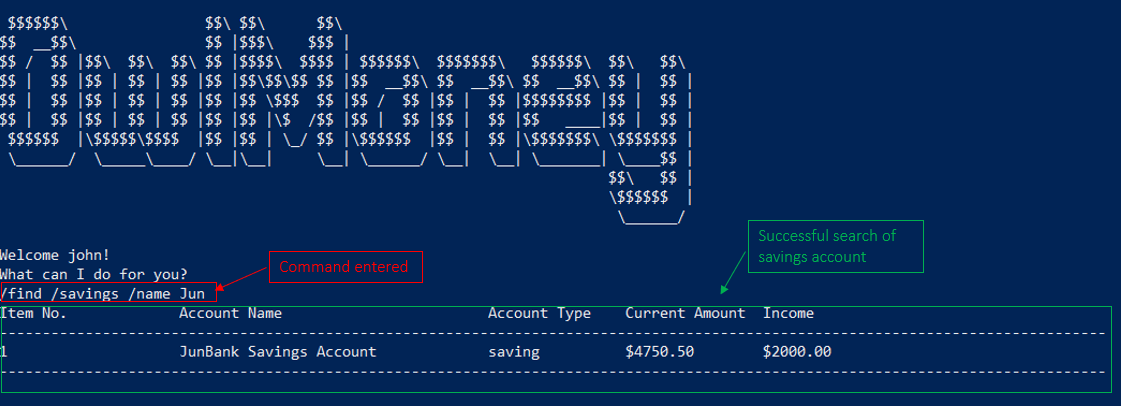
Command Example: /find /savings /name Jun
The command example allows the user to find and list all savings accounts that match the keyword Jun. This can
be seen from Figure 1 below.
/find /savings8.1.2. Finding Bank Transaction: /find /banktransaction
Scenario: Let’s say that you have thousands of bank transaction records and you want to find the details of a specific transaction record. Don’t worry OwlMoney allows you to find it with ease.
Command Syntax: /find /banktransaction /name ACCOUNT_NAME [/desc DESCRIPTION] [/from DATE /to DATE] [/category
CATEGORY]
|
Transactions include both expenditures and deposits.
|
|
The parameter within the square bracket (E.g. |
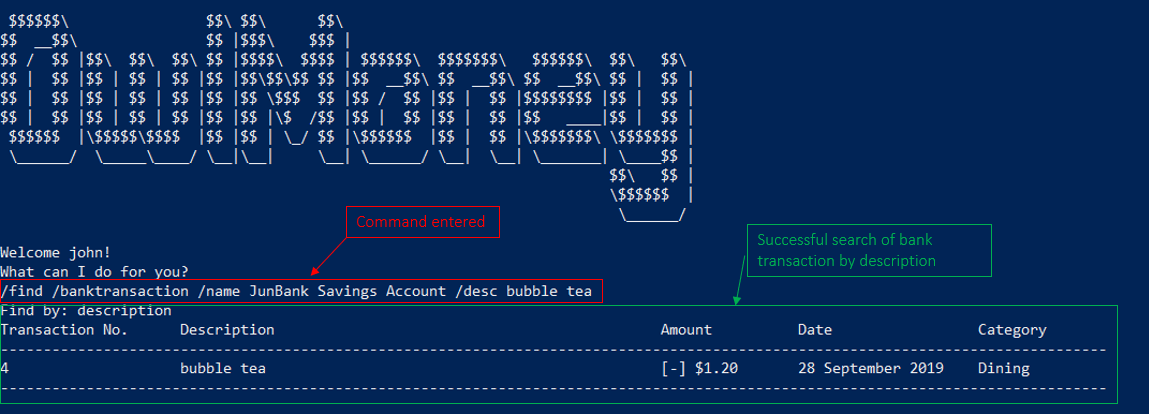
Command Example: /find /banktransaction /name JunBank Savings Account /desc bubble tea
The command example allows the user to find and list all transaction records that match the description bubble tea
charged to JunBank Savings Account. This can be seen from Figure 2 below.
/find /banktransaction|
For the complete list of functionality for |
9. Contributions to the Developer Guide
The following sections below showcase extracts of my contributions to the Developer Guide and my ability to write
documentation targeting end-users with little or no technical knowledge. In this section, it will only
showcase the find feature due to the page limit restriction. You can find more information about other features
implemented by me
here.
9.1. Design for find Feature
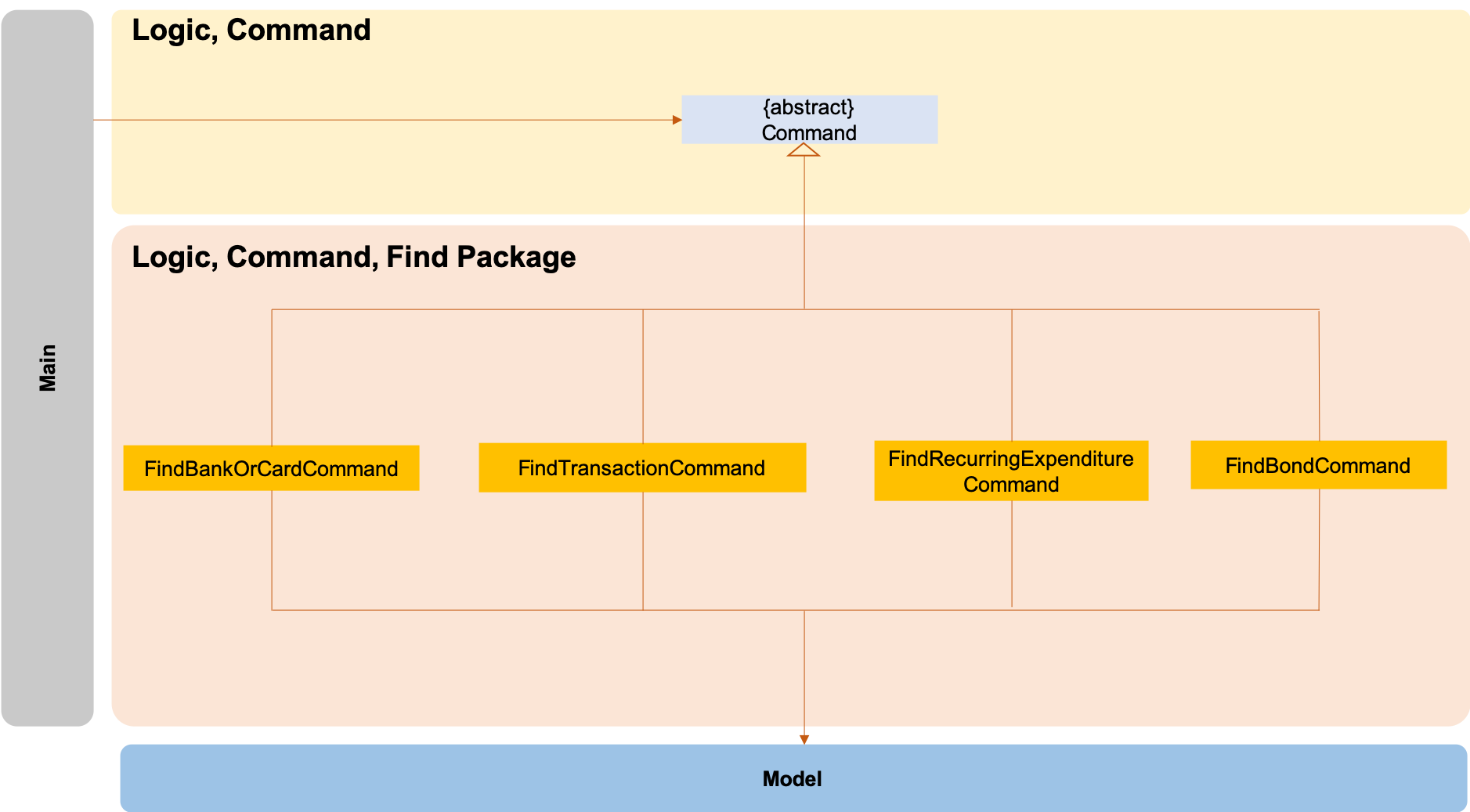
The logic.command.find package consist of Find classes with the ability to find any:
-
Bank accounts
-
Cards
-
Bonds
-
Card transactions
-
Bank transactions
-
Recurring Expenditures
Main will call the specific Find command class that will construct the required parameters before calling the
Profile class in Model to execute.
9.2. Implementation for find feature
The following section describes the specific implementation for finding of the savings account and how data flows across various objects and methods to obtain a successful execution. In this section, we will be showcasing the data flow of finding a savings account.
9.2.1. Finding of Savings Account
The /find /savings feature aims to provide the user with the ability to search for a savings account that matches the
keyword specified by the user. This enables the user to have great flexibility to view their savings account details
without the need of memorising each of their savings account names within OwlMoney. By allowing the user to search for
a specific savings account, it also aids in the operation of editing or deleting of savings account.
9.2.1.1. Current Implementation
The current implementation of finding savings account only allows the user to search through the name of the account. The reason to only allows the user to search through the account name was that searching through parameters such as income may be inaccurate, as a user’s income may change over time resulting in inconsistency in the search.
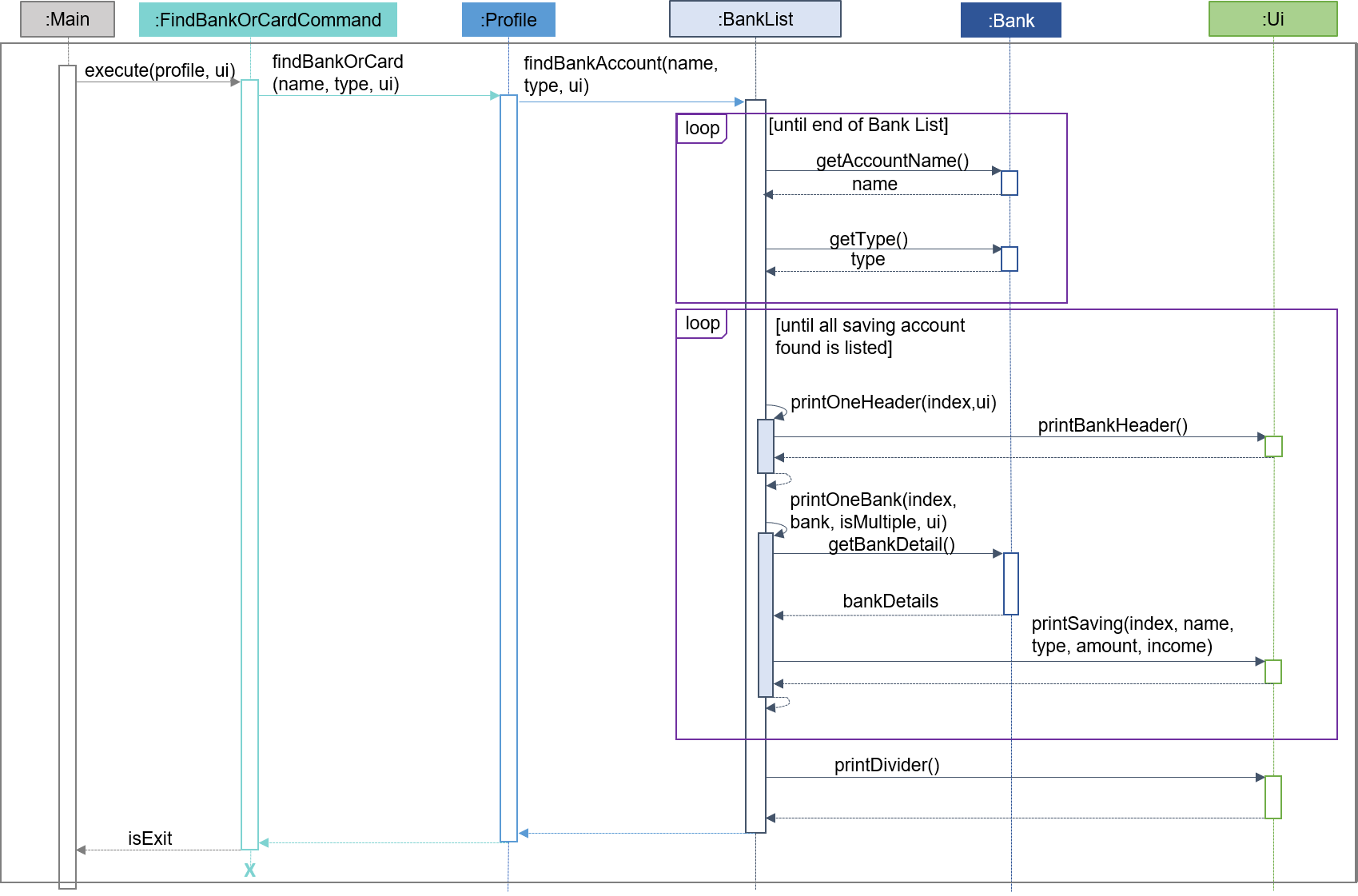
| The sequence diagram presented above is assumed to be a valid command which will produce a successful result. |
The sequence diagram presented above depicts the interaction between the Logic, Model and Ui component for running
FindBankOrCardCommand.
The FindBankOrCardCommand requires 2 inputs:
-
The name of the account that acts as a keyword for the search.
-
Type of object to be searched (e.g.
card,savingsorinvestment)
When the user executes the FindBankOrCardCommand to search for a savings account, the following steps are taken by the
application:
-
When the
FindBankOrCardCommandis executed, it will invokefindBankOrCard. -
Once invoked,
findBankOrCardwill perform the following checks:-
Check the type of object to be searched is either
card,savingsorinvestment.
-
-
After passing the above checks,
findBankOrCardwill invokefindBankAccount. -
Within the invocation of
findBankAccount, it will perform the following checks:-
Check for matching account name with the keyword among all accounts stored in the ArrayList.
-
Check whether the account that matches the keyword is indeed a savings account.
-
findBankAccount will throw an error if all bank accounts within the application fail the above checks.
|
-
Once the search has been completed, the details of all matching savings account will be displayed to inform the user of the successful matches.
9.2.1.2. Design Considerations
This section describes the various design considerations taken when implementing the find feature (e.g. /find
/savings or /find /banktransaction).
Aspect: Choice of whether the keyword (E.g. ACCOUNT_NAME, DESCRIPTION or CATEGORY) to be searched should be
case-sensitive or case-insensitive
| Approach | Pros | Cons |
|---|---|---|
1. Searching of objects based on the keyword is case-sensitive. |
|
|
2. Searching of objects based on the keyword is case-insensitive. |
|
|
After weighing the pros and cons, approach 2 was taken.
The reason for choosing approach 2 over approach 1 is mainly due to the flexibility that it can provide to a user. Although, searching for the object with case insensitivity might cause more unwanted results being displayed. We felt that the ability to easily match keyword with the object that the user would like to find is more important, as it enhanced the user-friendliness of OwlMoney.